Rich Article Select
Example Overview
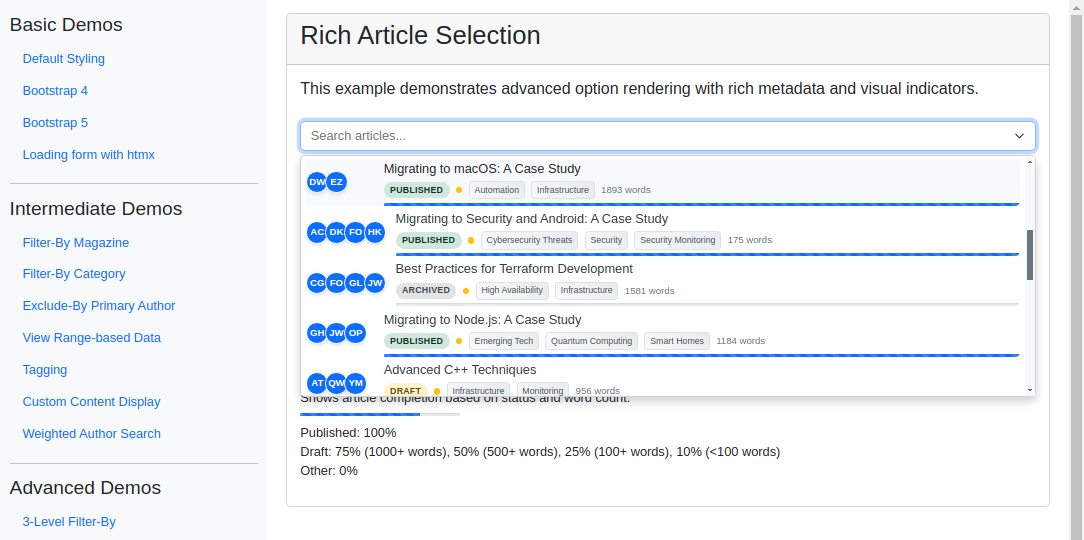
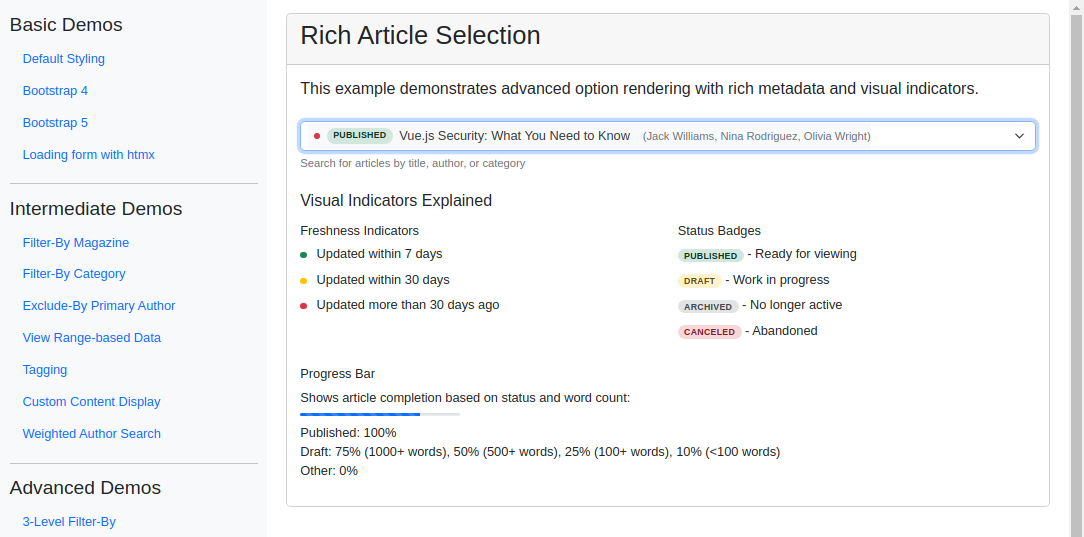
This example enriches the selection interface with a detailed, visually appealing dropdown. Each option is rendered with custom HTML - author avatars, status badges, freshness indicators, category tags, and progress bars - giving editors a comprehensive overview of each article before they select. Reach for this pattern when users need to browse and choose records based on several attributes at once.
Visual Examples
Key Code Segments
Forms
The form uses a TomSelectModelChoiceField with advanced rendering configurations. The TomSelectConfig object includes custom HTML templates for rendering options and selected items, allowing detailed metadata to be displayed in the dropdown.
The option template is included as a multiline string within the render attribute of the attrs dictionary. It uses JavaScript template literals to define the structure of each option, including author avatars, status badges, category tags, and progress bars.
Form Definition
class RichArticleSelectForm(forms.Form):
    """Form demonstrating rich article selection interface."""

    article = TomSelectModelChoiceField(
        config=TomSelectConfig(
            url="autocomplete-rich-article",
            value_field="id",
            label_field="title",
            placeholder=_("Search articles..."),
            highlight=True,
            preload=True,
            minimum_query_length=1,
            css_framework="bootstrap5",
            attrs={
                "render": {
                    "option": """
                        `<div class="article-option">
                            <div class="article-avatar">
                                ${data.authors.map(author => `
                                    <div class="author-avatar" title="${escape(author.name)}">
                                        ${escape(author.initials)}
                                    </div>
                                `).join('')}
                            </div>
                            <div class="article-info">
                                <div class="article-title">
                                    ${escape(data.title)}
                                </div>
                                <div class="article-meta">
                                    <span class="status-badge status-${data.status.toLowerCase()}">
                                        ${escape(data.status_display)}
                                    </span>
                                    <span class="freshness-indicator freshness-${data.freshness}"></span>
                                    ${data.categories.map(cat => `
                                        <span class="category-tag">
                                            ${escape(cat.name)}
                                        </span>
                                    `).join('')}
                                    <span>
                                        <i class="bi bi-card-text fs-5 meta-icon"></i>
                                        ${escape(data.word_count)} words
                                    </span>
                                </div>
                                <div class="progress-bar">
                                    <div class="progress-value" style="width: ${data.completion_score}%"></div>
                                </div>
                            </div>
                        </div>`
                    """,
                    "item": """
                        `<div class="selected-article d-flex align-items-center gap-2">
                            <span class="freshness-indicator freshness-${data.freshness}"></span>
                            <span class="status-badge status-${data.status.toLowerCase()}">
                                ${escape(data.status_display)}
                            </span>
                            ${escape(data.title)}
                            <small class="text-muted ms-2">
                                (${data.authors.map(a => escape(a.name)).join(', ')})
                            </small>
                        </div>`
                    """,
                }
            },
        ),
        help_text=_("Search for articles by title, author, or category"),
    )
Templates
The field is rendered in the form with minimal configuration, and custom rendering is handled in the TomSelectConfig. A key is provided to aid in understanding the custom rendering styles.
Template Code
{% extends "example/base_with_bootstrap5.html" %}
{% block extra_header %}
{{ form.media }}
<!-- Add Bootstrap Icons -->
<link href="https://cdn.jsdelivr.net/npm/bootstrap-icons@1.7.2/font/bootstrap-icons.css" rel="stylesheet">
<style>
/* Custom styles for rich article options */
.article-option {
display: flex;
padding: 10px;
gap: 12px;
align-items: center;
}
.article-avatar {
display: flex;
gap: 4px;
min-width: 85px;
}
.author-avatar {
width: 28px;
height: 28px;
border-radius: 50%;
background-color: #0d6efd;
color: white;
display: flex;
align-items: center;
justify-content: center;
font-size: 12px;
font-weight: bold;
box-shadow: 0 2px 4px rgba(0,0,0,0.1);
margin-left: -8px;
border: 2px solid white;
}
.author-avatar:first-child {
margin-left: 0;
}
.article-info {
flex: 1;
}
.article-meta {
display: flex;
align-items: center;
gap: 8px;
margin-top: 4px;
font-size: 12px;
color: #6c757d;
}
.status-badge {
padding: 2px 8px;
border-radius: 12px;
font-size: 11px;
font-weight: 600;
text-transform: uppercase;
letter-spacing: 0.03em;
}
.status-published { background-color: #d1e7dd; color: #0a3622; }
.status-draft { background-color: #fff3cd; color: #664d03; }
.status-archived { background-color: #e2e3e5; color: #41464b; }
.status-canceled { background-color: #f8d7da; color: #842029; }
.progress-bar {
height: 4px;
background-color: #e9ecef;
border-radius: 2px;
overflow: hidden;
margin-top: 4px;
box-shadow: inset 0 1px 2px rgba(0,0,0,0.1);
}
.progress-value {
height: 100%;
background-color: #0d6efd;
transition: width 0.4s ease-in-out;
background-image: linear-gradient(45deg,
rgba(255,255,255,.15) 25%,
transparent 25%,
transparent 50%,
rgba(255,255,255,.15) 50%,
rgba(255,255,255,.15) 75%,
transparent 75%,
transparent
);
background-size: 1rem 1rem;
animation: progress-bar-stripes 1s linear infinite;
}
.freshness-indicator {
width: 8px;
height: 8px;
border-radius: 50%;
flex-shrink: 0;
}
.freshness-recent { background-color: #198754; }
.freshness-medium { background-color: #ffc107; }
.freshness-old { background-color: #dc3545; }
.category-tag {
background: linear-gradient(45deg, #f8f9fa, #e9ecef);
border: 1px solid #dee2e6;
padding: 2px 6px;
border-radius: 4px;
font-size: 11px;
color: #495057;
}
.selected-article {
padding: 4px 8px;
background-color: #f8f9fa;
border-radius: 4px;
margin: -4px;
}
/* Dropdown enhancements */
.ts-dropdown .option {
padding: 0 !important;
margin: 4px 6px !important;
border-radius: 6px !important;
}
.ts-dropdown .option:hover,
.ts-dropdown .option.active {
background-color: #f8f9fa !important;
}
/* Custom scrollbar */
.ts-dropdown-content {
scrollbar-width: thin;
scrollbar-color: #6c757d #f8f9fa;
}
.ts-dropdown-content::-webkit-scrollbar {
width: 6px;
}
.ts-dropdown-content::-webkit-scrollbar-track {
background: #f8f9fa;
}
.ts-dropdown-content::-webkit-scrollbar-thumb {
background-color: #6c757d;
border-radius: 3px;
}
@keyframes progress-bar-stripes {
0% { background-position: 1rem 0; }
100% { background-position: 0 0; }
}
</style>
{% endblock %}
{% block content %}
<div class="card">
<div class="card-header">
<h2>Rich Article Selection</h2>
</div>
<div class="card-body">
<div class="demo-container">
<p class="lead mb-4">
This example demonstrates advanced option rendering with rich metadata and visual indicators.
</p>
<form method="post" class="mb-4">
{% csrf_token %}
<div class="mb-3">
{{ form.article }}
{% if form.article.help_text %}
<div class="form-text">{{ form.article.help_text }}</div>
{% endif %}
</div>
</form>
<div class="explanation-card">
<h3 class="h5 mb-3">Visual Indicators Explained</h3>
<div class="row">
<div class="col-md-6">
<h4 class="h6">Freshness Indicators</h4>
<ul class="list-unstyled">
<li class="mb-2">
<span class="freshness-indicator freshness-recent d-inline-block"></span>
<span class="ms-2">Updated within 7 days</span>
</li>
<li class="mb-2">
<span class="freshness-indicator freshness-medium d-inline-block"></span>
<span class="ms-2">Updated within 30 days</span>
</li>
<li class="mb-2">
<span class="freshness-indicator freshness-old d-inline-block"></span>
<span class="ms-2">Updated more than 30 days ago</span>
</li>
</ul>
</div>
<div class="col-md-6">
<h4 class="h6">Status Badges</h4>
<ul class="list-unstyled">
<li class="mb-2">
<span class="status-badge status-published">Published</span>
- Ready for viewing
</li>
<li class="mb-2">
<span class="status-badge status-draft">Draft</span>
- Work in progress
</li>
<li class="mb-2">
<span class="status-badge status-archived">Archived</span>
- No longer active
</li>
<li class="mb-2">
<span class="status-badge status-canceled">Canceled</span>
- Abandoned
</li>
</ul>
</div>
</div>
<div class="row mt-3">
<div class="col-12">
<h4 class="h6">Progress Bar</h4>
<p class="mb-2">Shows article completion based on status and word count:</p>
<div class="progress-bar mb-2" style="width: 200px;">
<div class="progress-value" style="width: 75%"></div>
</div>
<ul class="list-unstyled">
<li>Published: 100%</li>
<li>Draft: 75% (1000+ words), 50% (500+ words), 25% (100+ words), 10% (<100 words)</li>
<li>Other: 0%</li>
</ul>
</div>
</div>
</div>
</div>
</div>
</div>
{% endblock %}
Autocomplete Views
The autocomplete-rich-article endpoint processes user queries and retrieves rich article data. The view includes custom search logic, queryset annotations, and result formatting to provide detailed metadata for each article.
Autocomplete View
class RichArticleAutocompleteView(AutocompleteModelView):
    """Autocomplete view with rich metadata for articles."""

    model = Article
    search_lookups = [
        "title__icontains",
        "authors__name__icontains",
        "categories__name__icontains",
    ]
    ordering = ["-updated_at", "title"]
    page_size = 10

    skip_authorization = True

    def hook_queryset(self, queryset):
        """Add annotations for progress and prefetch related data."""
        return (
            queryset.select_related("magazine")
            .prefetch_related("authors", "categories")
            .annotate(
                days_since_update=Now() - F("updated_at"),
                completion_score=Case(
                    When(status="published", then=Value(100)),
                    When(
                        status="draft",
                        then=Case(
                            When(word_count__gte=1000, then=Value(75)),
                            When(word_count__gte=500, then=Value(50)),
                            When(word_count__gte=100, then=Value(25)),
                            default=Value(10),
                        ),
                    ),
                    default=Value(0),
                    output_field=IntegerField(),
                ),
            )
            .distinct()
        )

    def search(self, queryset, query):
        """Implement custom search that includes related fields."""
        if not query:
            return queryset

        # Split query into terms for more flexible matching
        terms = query.split()

        q_objects = Q()
        for term in terms:
            term_q = Q()
            for lookup in self.search_lookups:
                term_q |= Q(**{lookup: term})
            q_objects &= term_q

        return queryset.filter(q_objects)

    def prepare_results(self, results):
        """Format the article data with rich metadata."""
        formatted_results = []
        for article in results:
            # Calculate article freshness
            days_old = (timezone.now() - article.updated_at).days if article.updated_at else None
            freshness = "recent" if days_old and days_old < 7 else "medium" if days_old and days_old < 30 else "old"

            # Format authors with initials
            authors_data = [
                {
                    "name": author.name,
                    "initials": "".join(word[0].upper() for word in author.name.split() if word),
                    "article_count": author.article_set.count(),
                }
                for author in article.authors.all()
            ]

            # Format categories
            categories_data = [
                {
                    "name": category.name,
                    "article_count": category.article_set.count(),
                }
                for category in article.categories.all()
            ]

            formatted_results.append(
                {
                    "id": article.id,
                    "title": article.title,
                    "status": article.status,
                    "status_display": article.get_status_display(),
                    "word_count": article.word_count,
                    "completion_score": getattr(article, "completion_score", 0),
                    "freshness": freshness,
                    "authors": authors_data,
                    "categories": categories_data,
                    "updated_at": (article.updated_at.strftime("%Y-%m-%d %H:%M") if article.updated_at else ""),
                    "created_at": (article.created_at.strftime("%Y-%m-%d %H:%M") if article.created_at else ""),
                }
            )

        return formatted_results
Implementation Notes
Preloading: The dropdown is preloaded when focused to enhance user experience. If the preload option is disabled, the dropdown will load results only after the user starts typing.