Rich Author Multi-Select
Example Overview
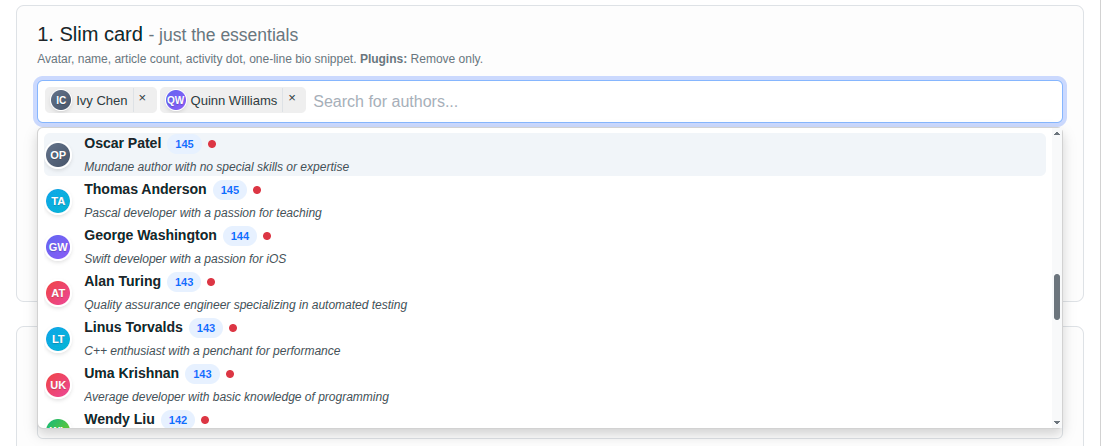
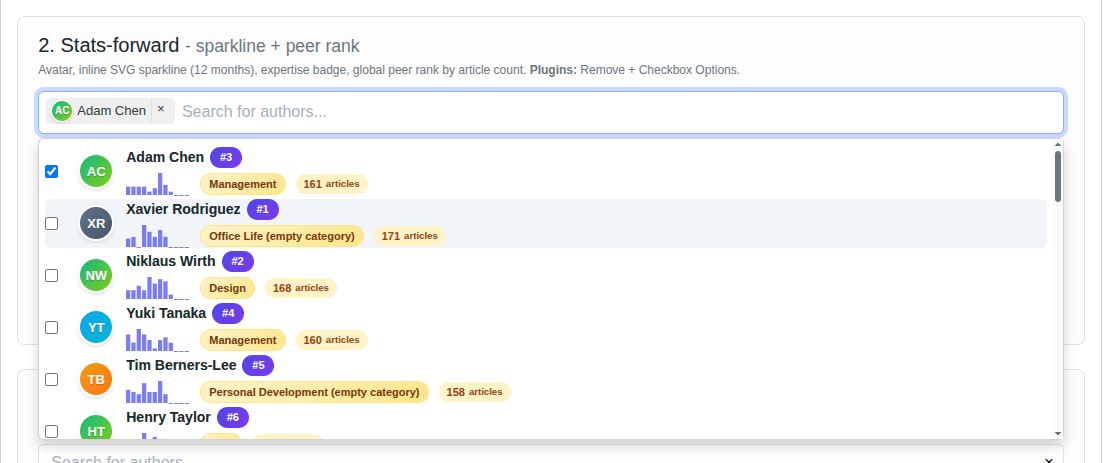
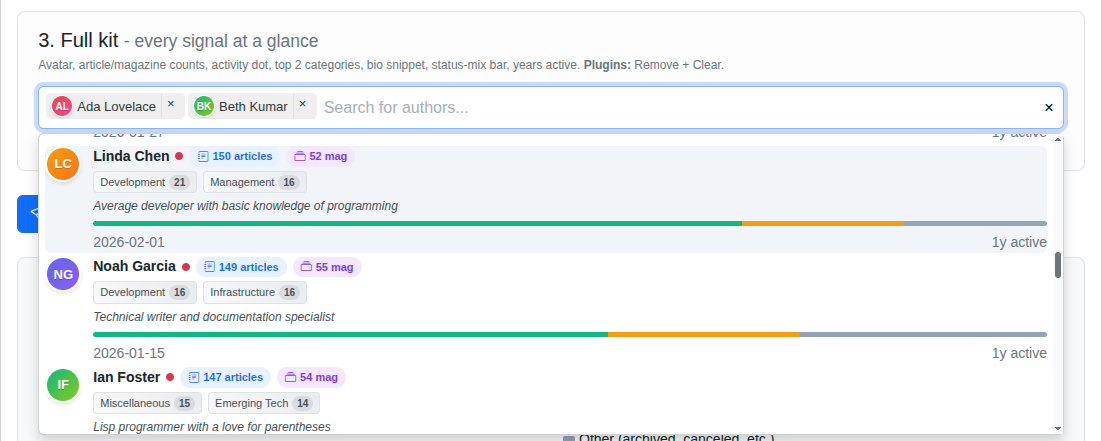
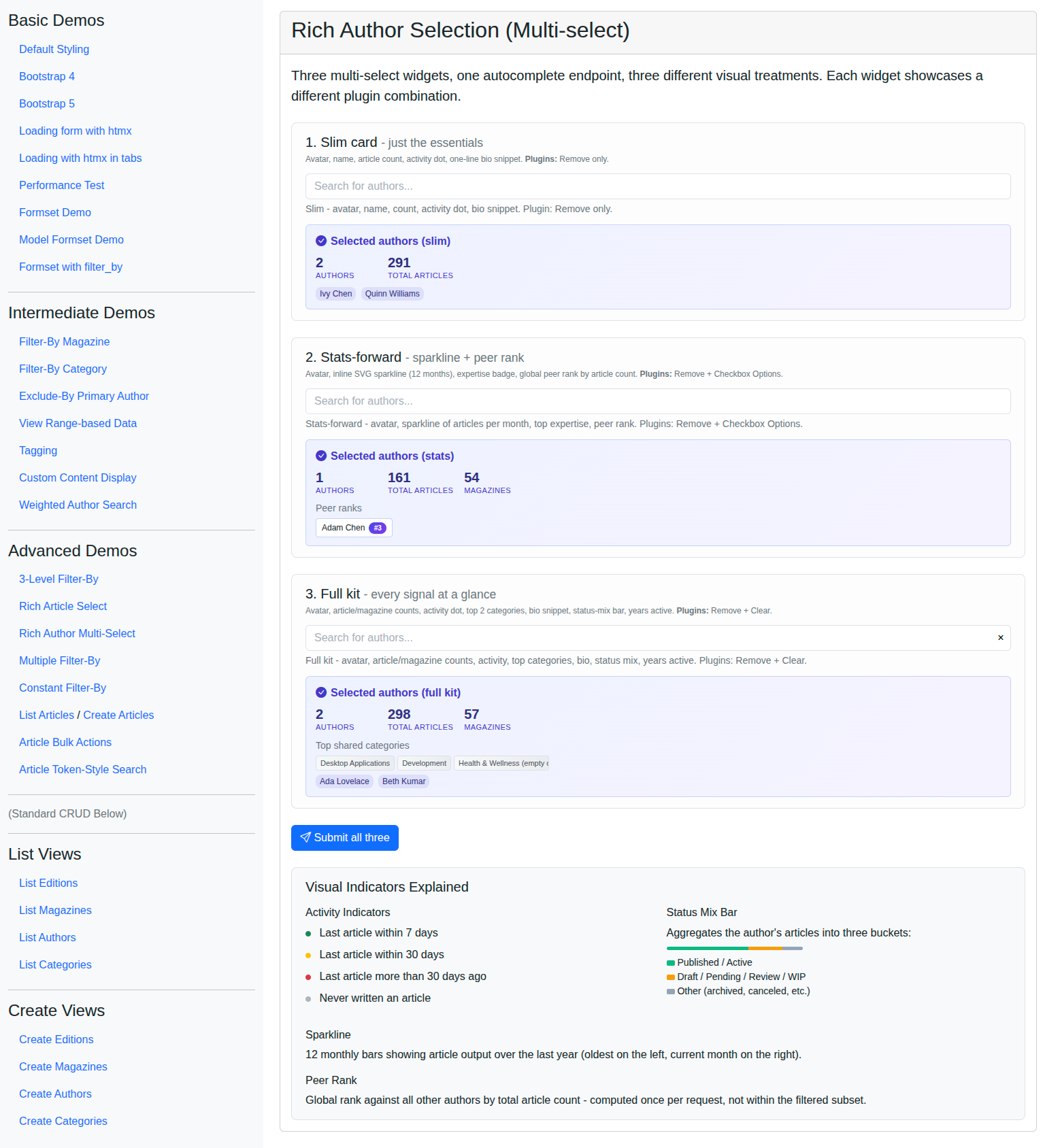
This example pairs with the Rich Article Select demo and pushes the idea further: three multi-select widgets on one page, all driven by the same autocomplete-rich-author endpoint, each rendering the same author payload with a different visual treatment and a different TomSelect plugin combination (slim card, a data-viz “stats” card with an inline SVG sparkline and peer rank, and an information-dense “full” card). It is the place to compare side-by-side what attrs["render"] lets you do without changing the backend, including how to compute non-trivial per-row data and handle POST of a multi-widget form with per-widget summary cards. Reach for these patterns on people-picker dashboards or when prototyping several rendering styles over one dataset.
Visual Examples
Key Code Segments
Forms
The form has three multi-select fields, all required=False so partial submissions work. All three point at the same autocomplete-rich-author endpoint and receive the same rich payload - only the attrs["render"] templates and plugin combinations differ.
A small _rich_author_base_config_kwargs() helper keeps the shared TomSelectConfig settings DRY (URL, value/label fields, preload, minimum query length, css framework, placeholder).
Item templates use only data.name (with a defensive client-side fallback to compute initials from the name). The TomSelectModelMultipleWidget re-hydrates a bound form’s selected items with only {value, label} - any extra keys would render as undefined for retained selections, so visual richness lives entirely in the option templates.
Form Definition
def _rich_author_base_config_kwargs():
    """Shared TomSelectConfig kwargs for the three Rich Author Multi-Select widgets."""
    return dict(
        url="autocomplete-rich-author",
        value_field="id",
        label_field="name",
        placeholder=_("Search for authors..."),
        highlight=True,
        preload=True,
        minimum_query_length=1,
        css_framework="bootstrap5",
    )


class RichAuthorMultiSelectForm(forms.Form):
    """Three multi-select widgets backed by the same Rich Author autocomplete."""

    authors_full = TomSelectModelMultipleChoiceField(
        required=False,
        config=TomSelectConfig(
            **_rich_author_base_config_kwargs(),
            plugin_remove_button=PluginRemoveButton(title=_("Remove this author")),
            plugin_clear_button=PluginClearButton(title=_("Clear all authors")),
            attrs={
                "render": {
                    "option": """
                        `<div class="author-option">
                            <div class="author-avatar-rich palette-${Number(data.avatar_palette_index)}"
                                 title="${escape(data.name)}">
                                ${escape(data.initials)}
                            </div>
                            <div class="author-body">
                                <div class="author-headline">
                                    <span class="author-name">${escape(data.name)}</span>
                                    <span class="activity-indicator activity-${escape(data.activity_level)}"
                                          title="${escape(data.last_active_display)}"></span>
                                    <span class="count-badge">
                                        <i class="bi bi-journal-text"></i>
                                        ${Number(data.article_count)} articles
                                    </span>
                                    <span class="magazines-pill">
                                        <i class="bi bi-collection"></i>
                                        ${Number(data.magazines_count)} mag
                                    </span>
                                </div>
                                <div class="author-meta">
                                    ${data.top_categories.map(cat => `
                                        <span class="category-chip" title="${escape(cat.name)}">
                                            ${escape(cat.name)}
                                            <span class="category-count">${Number(cat.count)}</span>
                                        </span>
                                    `).join('')}
                                </div>
                                <div class="author-bio">${escape(data.bio_snippet)}</div>
                                <div class="status-mix-bar" title="Status mix">
                                    ${data.status_mix.map(seg => seg.pct > 0 ? `
                                        <span class="status-mix-segment status-mix-segment-${escape(seg.key)}"
                                              style="flex-basis: ${Number(seg.pct)}%"
                                              title="${escape(seg.label)}: ${Number(seg.pct)}%"></span>
                                    ` : '').join('')}
                                </div>
                                <div class="author-footer">
                                    <span class="text-muted small">${escape(data.last_active_display)}</span>
                                    <span class="text-muted small">${Number(data.years_active)}y active</span>
                                </div>
                            </div>
                        </div>`
                    """,
                    "item": """
                        `<div class="selected-author-chip selected-author-chip-full">
                            <span class="author-avatar-rich author-avatar-chip
                                         palette-${Number(data.avatar_palette_index || 0)}">
                                ${escape(
                                    data.initials
                                    || (data.name || '')
                                        .split(' ')
                                        .map(w => w[0] || '')
                                        .join('')
                                        .slice(0, 2)
                                        .toUpperCase()
                                )}
                            </span>
                            <span class="ms-1">${escape(data.name)}</span>
                        </div>`
                    """,
                }
            },
        ),
        help_text=_(
            "Full kit - avatar, article/magazine counts, activity, top categories, bio, "
            "status mix, years active. Plugins: Remove + Clear."
        ),
    )

    authors_slim = TomSelectModelMultipleChoiceField(
        required=False,
        config=TomSelectConfig(
            **_rich_author_base_config_kwargs(),
            plugin_remove_button=PluginRemoveButton(title=_("Remove this author")),
            attrs={"render": {"option": "...slim option template...", "item": "...slim item template..."}},
        ),
        help_text=_("Slim - avatar, name, count, activity dot, bio snippet. Plugin: Remove only."),
    )

    authors_stats = TomSelectModelMultipleChoiceField(
        required=False,
        config=TomSelectConfig(
            **_rich_author_base_config_kwargs(),
            plugin_remove_button=PluginRemoveButton(title=_("Remove this author")),
            plugin_checkbox_options=PluginCheckboxOptions(),
            attrs={"render": {"option": "...stats option template with sparkline SVG...", "item": "..."}},
        ),
        help_text=_(
            "Stats-forward - avatar, sparkline of articles per month, top expertise, peer rank. "
            "Plugins: Remove + Checkbox Options."
        ),
    )
Templates
The page extends base_with_bootstrap5.html. The extra_header block carries Bootstrap Icons, custom CSS for the gradient avatars (six palette gradients keyed off a stable hash of the author’s name), the status-mix bar, sparkline bars, and the per-widget showcase cards. The content block renders the three widgets in showcase cards from slim to stats to full, with each card conditionally including a summary partial after a POST.
A small partial (_author_selection_summary.html) accepts summary and variant ("full", "slim", or "stats") and emphasizes different stats per widget.
Template Excerpt
{% extends "example/base_with_bootstrap5.html" %}
{% load i18n %}

{% block extra_header %}
    {{ form.media }}
    <link href="https://cdn.jsdelivr.net/npm/bootstrap-icons@1.7.2/font/bootstrap-icons.css" rel="stylesheet">
    <style>
        /* Six gradient palettes for deterministic avatar colors */
        .author-avatar-rich.palette-0 { background: linear-gradient(135deg, #6366f1 0%, #8b5cf6 100%); }
        .author-avatar-rich.palette-1 { background: linear-gradient(135deg, #0ea5e9 0%, #06b6d4 100%); }
        .author-avatar-rich.palette-2 { background: linear-gradient(135deg, #10b981 0%, #84cc16 100%); }
        .author-avatar-rich.palette-3 { background: linear-gradient(135deg, #f59e0b 0%, #f97316 100%); }
        .author-avatar-rich.palette-4 { background: linear-gradient(135deg, #ef4444 0%, #ec4899 100%); }
        .author-avatar-rich.palette-5 { background: linear-gradient(135deg, #64748b 0%, #475569 100%); }

        /* Activity indicator (matches article demo freshness conventions) */
        .activity-recent { background-color: #198754; }
        .activity-medium { background-color: #ffc107; }
        .activity-old    { background-color: #dc3545; }
        .activity-never  { background-color: #adb5bd; }

        /* Status mix bar segments */
        .status-mix-segment-published { background-color: #10b981; }
        .status-mix-segment-draft     { background-color: #f59e0b; }
        .status-mix-segment-other     { background-color: #94a3b8; }

        /* Sparkline bars in the inline SVG */
        .sparkline-bar { fill: #6366f1; opacity: 0.85; }

        /* ...full stylesheet in the actual demo template... */
    </style>
{% endblock %}

{% block content %}
    <form method="post" class="mb-4">
        {% csrf_token %}

        <div class="widget-showcase-card">
            <h3 class="h5">1. {% translate "Slim card" %}</h3>
            {{ form.authors_slim }}
            {% if authors_slim_summary %}
                {% include "example/advanced_demos/_author_selection_summary.html" with summary=authors_slim_summary variant="slim" %}
            {% endif %}
        </div>

        <div class="widget-showcase-card">
            <h3 class="h5">2. {% translate "Stats-forward" %}</h3>
            {{ form.authors_stats }}
            {% if authors_stats_summary %}
                {% include "example/advanced_demos/_author_selection_summary.html" with summary=authors_stats_summary variant="stats" %}
            {% endif %}
        </div>

        <div class="widget-showcase-card">
            <h3 class="h5">3. {% translate "Full kit" %}</h3>
            {{ form.authors_full }}
            {% if authors_full_summary %}
                {% include "example/advanced_demos/_author_selection_summary.html" with summary=authors_full_summary variant="full" %}
            {% endif %}
        </div>

        <button type="submit" class="btn btn-primary">
            <i class="bi bi-send"></i> {% translate "Submit all three" %}
        </button>
    </form>
{% endblock %}
View
The view handles GET and POST. On POST, it always re-renders an unbound form (so widgets start clean - because item templates only carry name, retained chips would otherwise display partial data), and it adds a per-widget summary card to the context for each field that had selections. A small private helper aggregates total articles, distinct magazines, shared categories, and global peer ranks across the selections.
View
def _build_author_summary(authors_qs):
    """Aggregate stats across a queryset of selected authors for the summary card."""
    authors_list = list(authors_qs)
    count = len(authors_list)
    if count == 0:
        return {"count": 0, "total_articles": 0, "shared_categories": [],
                "magazines_count": 0, "names": [], "peer_ranks": []}

    articles_qs = Article.objects.filter(authors__in=authors_list).distinct()
    total_articles = articles_qs.count()
    magazines_count = articles_qs.values("magazine").distinct().count()

    from collections import Counter
    category_share_counter: Counter = Counter()
    for author in authors_list:
        seen_for_author = set()
        for article in author.article_set.all():
            for category in article.categories.all():
                if category.name not in seen_for_author:
                    seen_for_author.add(category.name)
                    category_share_counter[category.name] += 1
    shared_categories = [name for name, _c in category_share_counter.most_common(3)]

    rank_ids = list(
        Author.objects.annotate(article_count=Count("article", distinct=True))
        .order_by("-article_count", "name")
        .values_list("id", flat=True)
    )
    rank_map = {pk: i + 1 for i, pk in enumerate(rank_ids)}
    peer_ranks = [(author.name, rank_map.get(author.id, 0)) for author in authors_list]

    return {
        "count": count,
        "total_articles": total_articles,
        "shared_categories": shared_categories,
        "magazines_count": magazines_count,
        "names": [author.name for author in authors_list],
        "peer_ranks": peer_ranks,
    }


def rich_author_multi_select_demo(request):
    """View demonstrating three multi-select widgets sharing one rich autocomplete."""
    template = "example/advanced_demos/rich_author_multi_select.html"
    if request.method == "POST":
        bound = RichAuthorMultiSelectForm(request.POST)
        context = {"form": RichAuthorMultiSelectForm()}
        if bound.is_valid():
            for field_name in ("authors_full", "authors_slim", "authors_stats"):
                authors_qs = bound.cleaned_data.get(field_name)
                if authors_qs:
                    context[f"{field_name}_summary"] = _build_author_summary(authors_qs)
        else:
            context["form"] = bound
        return TemplateResponse(request, template, context)
    return TemplateResponse(request, template, {"form": RichAuthorMultiSelectForm()})
Autocomplete View
RichAuthorAutocompleteView annotates the queryset with article and magazine counts, prefetches the author’s articles (with select_related("magazine") and prefetch_related("categories")) for N+1-free Python aggregation, and overrides search() to require every whitespace-separated term to match name OR bio (the same AND-of-OR pattern used by RichArticleAutocompleteView).
prepare_results() builds the dict shape from scratch and adds derived fields used by the three render templates: stable avatar_palette_index (via zlib.adler32), initials, bio_snippet, activity_level (recent / medium / old / never), top_categories (top 2 by occurrence), status_mix (three integer-percent buckets that sum to exactly 100), monthly_sparkline (12 integer counts) and sparkline_bars (server-normalized to 0…100 for direct use in the SVG), expertise, years_active, and a global peer_rank computed from a per-request rank map (not a window function inside the filtered subset).
Autocomplete View
_PUBLISHED_STATUSES = {ArticleStatus.PUBLISHED.value, ArticleStatus.ACTIVE.value}
_DRAFT_STATUSES = {
    ArticleStatus.DRAFT.value,
    ArticleStatus.PENDING.value,
    ArticleStatus.ON_REVIEW.value,
    ArticleStatus.NEEDS_REVIEW.value,
    ArticleStatus.IN_PROGRESS.value,
    ArticleStatus.WIP.value,
}
_AVATAR_PALETTE_COUNT = 6


def _bucket_status(status_value):
    """Group ArticleStatus into three demo-friendly buckets."""
    if status_value in _PUBLISHED_STATUSES:
        return "published"
    if status_value in _DRAFT_STATUSES:
        return "draft"
    return "other"


class RichAuthorAutocompleteView(AutocompleteModelView):
    model = Author
    search_lookups = ["name__icontains", "bio__icontains"]
    ordering = ["-article_count", "name"]
    page_size = 10
    value_fields = ["id", "name", "bio"]
    skip_authorization = True

    def hook_queryset(self, queryset):
        return queryset.annotate(
            article_count=Count("article", distinct=True),
            last_active=Max("article__updated_at"),
            magazines_count=Count("article__magazine", distinct=True),
        ).prefetch_related(
            Prefetch(
                "article_set",
                queryset=Article.objects.select_related("magazine").prefetch_related("categories"),
            )
        )

    def search(self, queryset, query):
        if not query:
            return queryset
        terms = query.split()
        q_objects = Q()
        for term in terms:
            term_q = Q()
            for lookup in self.search_lookups:
                term_q |= Q(**{lookup: term})
            q_objects &= term_q
        return queryset.filter(q_objects)

    def prepare_results(self, results):
        rank_ids = list(
            Author.objects.annotate(article_count=Count("article", distinct=True))
            .order_by("-article_count", "name")
            .values_list("id", flat=True)
        )
        rank_map = {pk: i + 1 for i, pk in enumerate(rank_ids)}

        now = timezone.now()
        formatted = []
        for author in results:
            # ...derive initials, palette index, activity_level, top_categories,
            # status_mix (sums to exactly 100), monthly_sparkline + sparkline_bars,
            # expertise, years_active, peer_rank...
            formatted.append({
                "id": author.id,
                "name": author.name,
                "bio": author.bio,
                "bio_snippet": "...",
                "initials": "...",
                "avatar_palette_index": zlib.adler32(author.name.encode("utf-8")) % _AVATAR_PALETTE_COUNT,
                "article_count": getattr(author, "article_count", 0),
                "magazines_count": getattr(author, "magazines_count", 0),
                "activity_level": "...",
                "last_active_display": "...",
                "years_active": ...,
                "top_categories": [...],
                "expertise": "...",
                "status_mix": [...],
                "monthly_sparkline": [...],
                "sparkline_bars": [...],
                "peer_rank": rank_map.get(author.id, 0),
            })
        return formatted
Design and Implementation Notes
Why three widgets, one endpoint?
The whole point of the demo is the lesson: with attrs["render"], the same server payload can drive radically different visual treatments. Wiring three endpoints would teach the wrong thing. The trade-off is a slightly larger payload for the slim widget (it ignores fields like sparkline_bars and status_mix); for a real production app you would typically have widgets pick their own subset.
Plugins per widget
Widget |
Plugins |
UX hint |
|---|---|---|
Slim |
|
Minimal chrome, fastest perception |
Stats |
|
Checkbox rows reinforce the “build a panel” feel |
Full |
|
Bulk clear is helpful when the dropdown is information-dense |
PluginDropdownHeader is intentionally not used here - it adds a tabular column header row that does not line up with the rich card layout, and would feel like visual noise.
Why item templates only reference data.name
Tom Select’s TomSelectModelMultipleWidget._get_selected_options rebuilds bound-form selected items as {value, label} only (plus optional url fields). Item templates that referenced activity_level, peer_rank, top_categories, etc., would render undefined for retained selections after a POST. To keep the post-submit chip behavior clean, item templates use only data.name (with a defensive client-side fallback to compute initials). All visual richness lives in the option template, which is rendered from full live AJAX payloads.
After form submission the view also renders an unbound form, so even the limited item template never runs on partial data.
Stable avatar gradients across restarts
Avatar colors are derived from zlib.adler32(author.name.encode("utf-8")) % 6. Python’s built-in hash() is randomized between processes, so it would produce different colors on every server restart. adler32 is stable and deterministic, which keeps the same author looking the same color across page reloads.
Status mix that always sums to 100%
The status_mix array contains three buckets - published (PUBLISHED / ACTIVE), draft (DRAFT / PENDING / ON_REVIEW / NEEDS_REVIEW / IN_PROGRESS / WIP), and other (everything else, including archived, canceled, etc.). Integer percentages are computed from raw counts, then the rounding remainder is added to the largest bucket so the bar always fills to exactly 100%. Exact-match allowlists are used rather than substring matching so “unpublished” is not miscounted as “published”.
Global peer rank, not subset rank
Peer rank is computed once per autocomplete request from a fresh queryset that is not filtered by the search terms. A Django Window function inside hook_queryset() would have ranked only within the filtered subset, which would have been misleading. The extra query is cheap and bounded by the total author count.
Server-side sparkline normalization
sparkline_bars is computed as round(100 * count / max(monthly_sparkline)) for each of the 12 months. The SVG template multiplies by 22/100 to map into the 24-pixel-tall viewBox, with a Math.max(1, ...) floor so non-zero months always show a visible bar. Doing the normalization server-side means the JS template is purely declarative.
Verifying the demo end-to-end
Spin up the dev server:
uv run python manage.py runserverOpen each dropdown; confirm gradient avatars stay stable across page reloads, status mix bars sum visually to 100%, and the sparkline renders 12 bars.
Select a few authors in each widget and submit. The three summary cards should appear underneath their respective widgets; the widgets themselves reset to empty.