Article Token Search (Advanced)
Example Overview
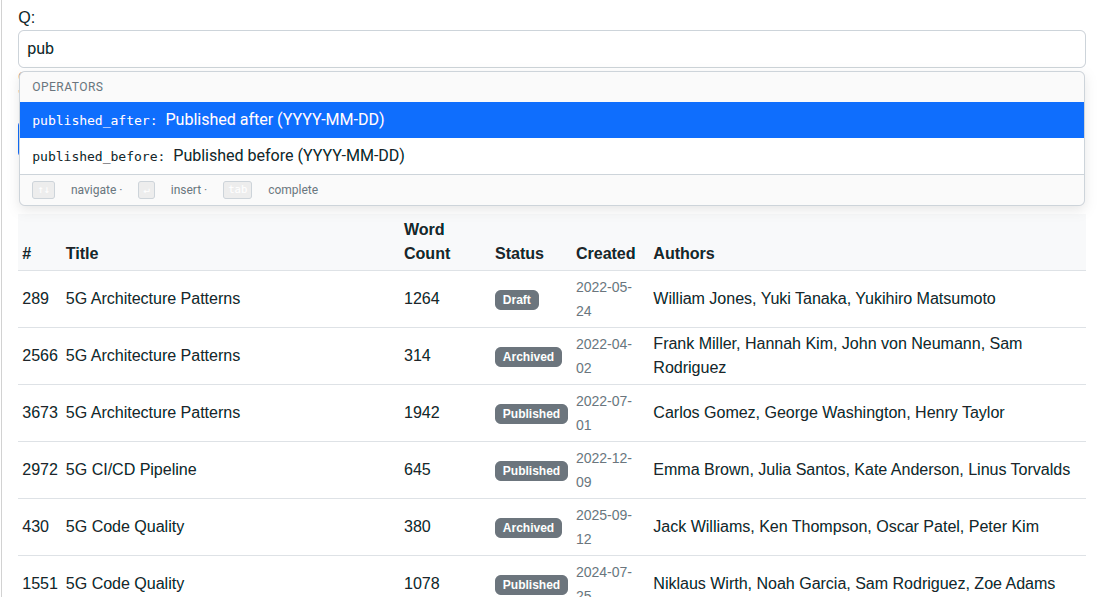
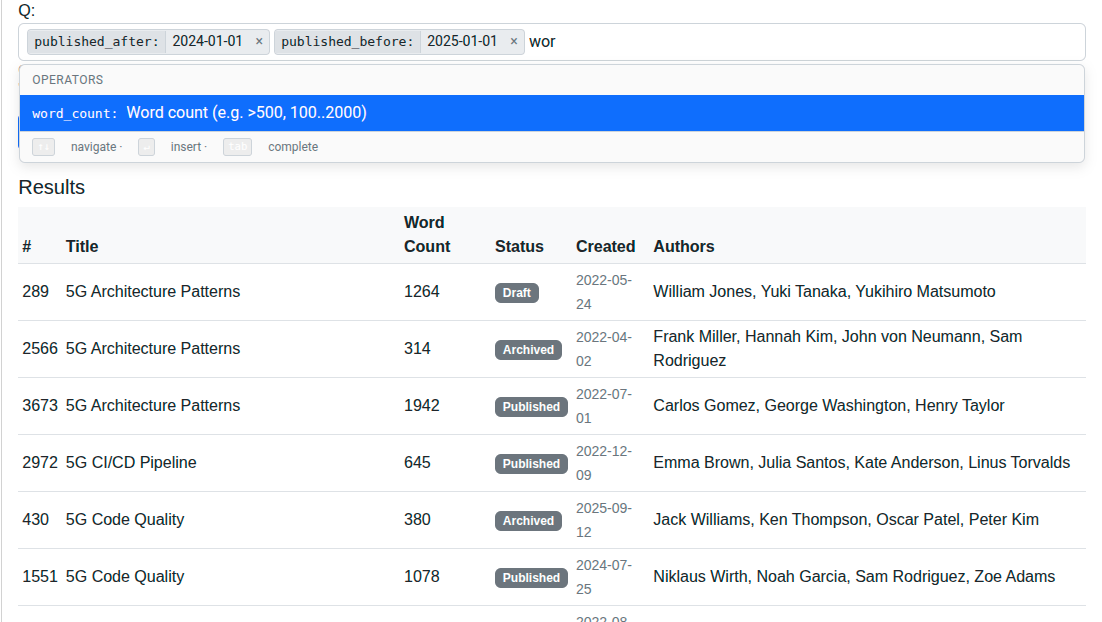
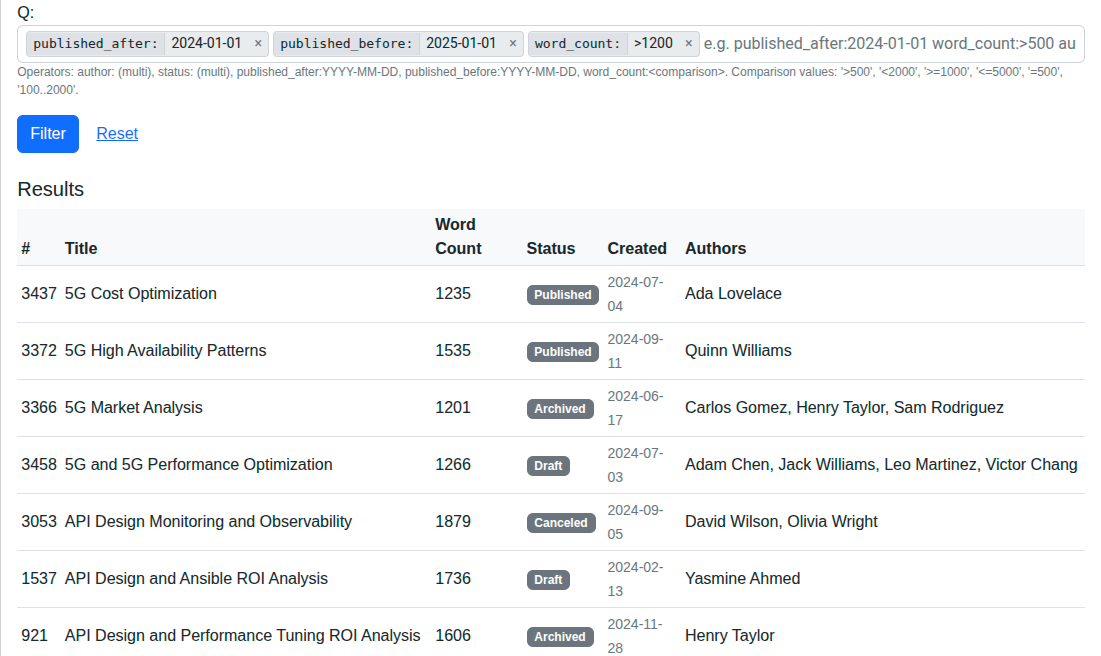
This example is the companion to the basic Article Token-Style Search. Both demos use TomSelectTokenWidget against a CompositeAutocompleteView, but where the basic demo uses Operator.filter_lookup for exact / __in matching, this one uses Operator.q_translator - a callable that receives (op, list[values]) and returns an arbitrary Q object. That unlocks date comparisons, numeric ranges, and any other ORM lookup you can express in Q, with comparison/range syntax encoded inside the token value. Reach for it on triage, inbox, or log-search UIs that need date and numeric filters alongside equality filters in a single bookmarkable URL.
Visual Examples
Key Code Segments
q_translator callables
The translator receives the Operator and the parsed list of token values
(length 1 for multi=False, length N for multi=True). It must return a Q
object. Raising ValueError is the supported way to signal a bad value - the
parser wraps it into a ValidationError for the form.
from django.db.models import Q
from django.utils.dateparse import parse_date

def _parse_iso_date(values):
    raw = (values[0] or "").strip()
    parsed = parse_date(raw)
    if not parsed:
        raise ValueError(f"Invalid date: {raw!r}. Use YYYY-MM-DD.")
    return parsed

def _q_published_after(op, values):
    return Q(created_at__date__gte=_parse_iso_date(values))

def _q_published_before(op, values):
    return Q(created_at__date__lt=_parse_iso_date(values))

def _q_word_count(op, values):
    """Accepts >500, <2000, >=1000, <=5000, =500, 100..2000, or a plain int."""
    raw = (values[0] or "").strip()
    if ".." in raw:
        lo, hi = raw.split("..", 1)
        return Q(word_count__gte=int(lo), word_count__lte=int(hi))
    for prefix, lookup in ((">=", "gte"), ("<=", "lte"),
                            (">", "gt"), ("<", "lt"), ("=", "exact")):
        if raw.startswith(prefix):
            return Q(**{f"word_count__{lookup}": int(raw[len(prefix):])})
    return Q(word_count__exact=int(raw))
These callables are simplified for brevity. The live source in
example_project/example/autocompletes.pywraps error strings for translation and adds moreValueErrorguards (e.g. inverted ranges, non-integer values).
NoSuggestionAutocompleteView
Operator requires view to be set even when q_translator handles the
filtering, because the widget can also call ?mode=value&op=<key>&q=... to
populate a value dropdown. For free-form operators (dates, comparisons) there
is nothing useful to suggest, so we bind those operators to a stub view that
returns an empty queryset. Without this stub, typing published_after: would
pop unrelated article suggestions whose ids would then be the wrong type for
_q_published_after.
class NoSuggestionAutocompleteView(AutocompleteModelView):
    """Empty-result placeholder for operators with free-form values."""

    model = Article
    value_fields = ["id"]
    skip_authorization = True

    def get_queryset(self):
        return Article.objects.none()
Composite view with mixed operator kinds
class ArticleAdvancedTokenQueryView(CompositeAutocompleteView):
    operators = [
        Operator(key="author", view=AuthorAutocompleteView,
                 value_field="id", label_field="name", label=_("Author"),
                 filter_lookup="authors__id", multi=True),
        Operator(key="status", view=ArticleStatusAutocompleteView,
                 value_field="value", label_field="label", label=_("Status"),
                 filter_lookup="status", multi=True),
        Operator(key="published_after", view=NoSuggestionAutocompleteView,
                 value_field="id", label_field="id", label=_("Published after (YYYY-MM-DD)"),
                 q_translator=_q_published_after, max_count=1),
        Operator(key="published_before", view=NoSuggestionAutocompleteView,
                 value_field="id", label_field="id", label=_("Published before (YYYY-MM-DD)"),
                 q_translator=_q_published_before, max_count=1),
        Operator(key="word_count", view=NoSuggestionAutocompleteView,
                 value_field="id", label_field="id", label=_("Word count (e.g. >500, 100..2000)"),
                 q_translator=_q_word_count, max_count=1),
    ]
    free_text_lookups = ["title__icontains"]
Form
from django_tomselect.forms import TomSelectTokenField


class ArticleAdvancedTokenSearchForm(forms.Form):
    q = TomSelectTokenField(
        composite_view="autocomplete-article-advanced-token",
        required=False,
        allow_free_text=True,
        max_tokens=20,
    )
The live form also passes
widget_kwargs={"placeholder": _("e.g. published_after:2024-01-01 word_count:>500 author:1")}and ahelp_textenumerating the supported operators; both are omitted here for brevity.
View
Error handling matches the basic token demo. ParsedQuery.apply() catches
ValueError and TypeError raised by q_translator callables and re-raises
them as ValidationError, which the view surfaces via
form.add_error("q", exc).
from django.core.exceptions import ValidationError
from django_tomselect.query import parse_query


def article_advanced_token_search_view(request):
    form = ArticleAdvancedTokenSearchForm(request.GET or None)
    articles = Article.objects.none()

    if not request.GET:
        # First load (no query string): show a sample of recent articles.
        articles = Article.objects.all().distinct()[:50]
    elif form.is_valid():
        q = form.cleaned_data.get("q", "") or ""
        if q:
            parsed = parse_query(q, ArticleAdvancedTokenQueryView)
            try:
                articles = parsed.apply(Article.objects.all()).distinct()[:50]
            except ValidationError as exc:
                form.add_error("q", exc)
        else:
            articles = Article.objects.all().distinct()[:50]

    return TemplateResponse(
        request,
        "example/advanced_demos/article_advanced_token_search.html",
        {"form": form, "articles": articles},
    )
URL Wiring
path(
    "autocomplete/article-advanced-token/",
    autocompletes.ArticleAdvancedTokenQueryView.as_view(),
    name="autocomplete-article-advanced-token",
),
path(
    "autocomplete/no-suggestion/",
    autocompletes.NoSuggestionAutocompleteView.as_view(),
    name="autocomplete-no-suggestion",
),
path(
    "article-advanced-token-search/",
    views.article_advanced_token_search_view,
    name="article-advanced-token-search",
),
Try It
Action |
Result |
|---|---|
Type |
Articles created on or after 2024-01-01. |
Type |
Articles created strictly before 2024-12-31. |
Combine |
Inclusive-start, exclusive-end date range. |
Type |
Articles longer than 500 words. |
Type |
Inclusive numeric range. |
Type |
Greater-or-equal comparison. |
Type |
Multi-value via comma ( |
Type |
Inline |
Type |
Tom Select dropdown shows nothing (the placeholder view returns an empty queryset). |
Bookmark a URL with a tokenized query |
Chips rehydrate on reload, including the free-form date/range tokens. |
When to choose q_translator vs. filter_lookup
filter_lookup: when the user picks a value from a dropdown that maps to an ORM__in/ equality lookup. The bound view’s autocomplete suggests valid values; the parsed token value is one of those ids.q_translator: when the value cannot be enumerated (dates, numbers, free-form expressions) or when you need a non-trivial lookup (range, geo-distance, full-text rank, JSON path, embedding similarity). Pair with aNoSuggestionAutocompleteViewif browsing the bound view’s data is not a useful UX for that operator.