3-Level Filter-By Example
Example Overview
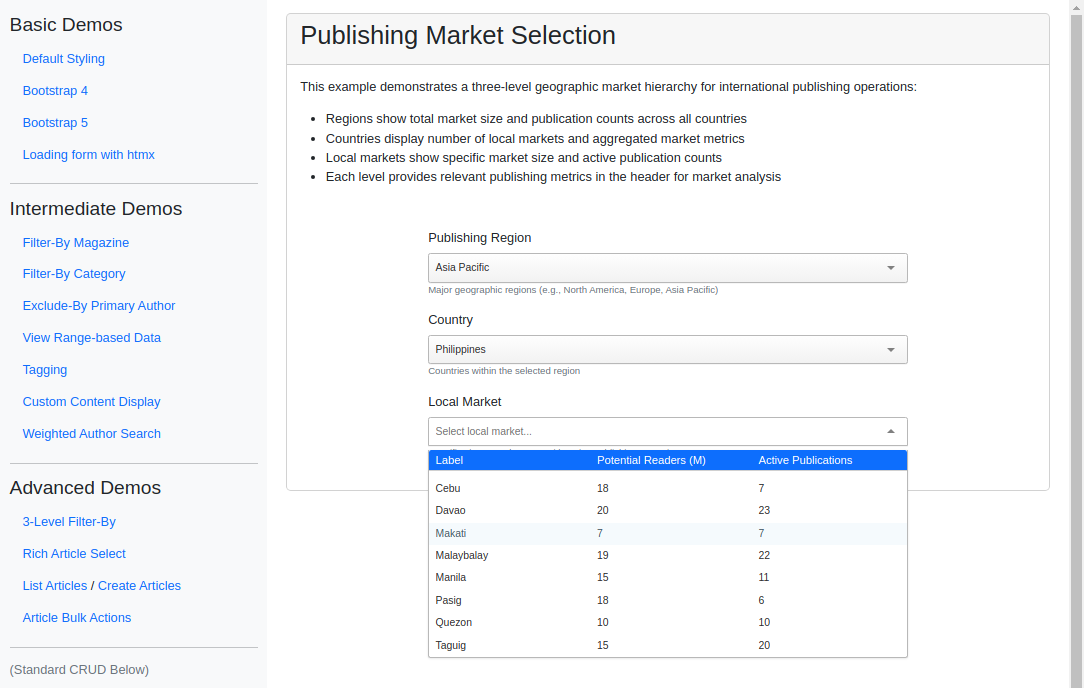
This example chains three TomSelectModelChoiceField dropdowns into a hierarchical selection where each level filters on the choice made in the level above it: region, then country, then local market. Every level uses PluginDropdownHeader to present supporting metrics alongside the options. Use this pattern for any multi-tiered dependent selection, such as publishing regions down to local markets or car make >> model >> trim.
Visual Examples
Key Code Segments
Forms
The form leverages TomSelectModelChoiceField to define hierarchical filtering.
Form Definition
class MarketSelectionForm(forms.Form):
    """Form for selecting publishing markets in a three-level hierarchy."""

    region = TomSelectModelChoiceField(
        config=TomSelectConfig(
            url="autocomplete-region",
            value_field="id",
            label_field="name",
            placeholder="Select region...",
            highlight=True,
            preload="focus",
            plugin_dropdown_header=PluginDropdownHeader(
                title="Publishing Regions",
                extra_columns={
                    "total_markets": "Markets",
                    "aggregated_readers": "Potential Readers (M)",
                    "aggregated_publications": "Active Publications",
                },
            ),
        ),
        required=True,
    )

    country = TomSelectModelChoiceField(
        config=TomSelectConfig(
            url="autocomplete-country",
            value_field="id",
            label_field="name",
            filter_by=("region", "parent_id"),
            placeholder="Select country...",
            highlight=True,
            plugin_dropdown_header=PluginDropdownHeader(
                title="Countries",
                extra_columns={
                    "total_local_markets": "Local Markets",
                    "total_reader_base": "Potential Readers (M)",
                    "total_pub_count": "Publications",
                },
            ),
        ),
        required=False,
    )

    local_market = TomSelectModelChoiceField(
        config=TomSelectConfig(
            url="autocomplete-local-market",
            value_field="id",
            label_field="name",
            filter_by=("country", "parent_id"),
            placeholder="Select local market...",
            highlight=True,
            plugin_dropdown_header=PluginDropdownHeader(
                title="Local Markets",
                extra_columns={
                    "market_size": "Potential Readers (M)",
                    "active_publications": "Active Publications",
                },
            ),
        ),
        required=False,
    )
Templates
The form fields are rendered dynamically in the template.
Template Code
{% extends 'example/base_with_bootstrap5.html' %}

{% block extra_header %}
    {{ form.media }}
    <style>
        .helptext {
            font-size: 12px;
            color: #6c757d;
        }
        .market-container {
            max-width: 600px;
            margin: 20px auto;
        }
    </style>
{% endblock %}

{% block content %}
<div class="card">
    <div class="card-header">
        <h2>Publishing Market Selection</h2>
    </div>
    <div class="card-body">
        <div class="pb-3">
            <p>This example demonstrates a three-level geographic market hierarchy for international publishing operations:</p>
            <ul>
                <li>Regions show total market size and publication counts across all countries</li>
                <li>Countries display number of local markets and aggregated market metrics</li>
                <li>Local markets show specific market size and active publication counts</li>
                <li>Each level provides relevant publishing metrics in the header for market analysis</li>
            </ul>
        </div>

        <div class="market-container">
            <form method="post">
                {% csrf_token %}
                <div class="mb-3">
                    <label for="{{ form.region.id_for_label }}" class="form-label">Publishing Region</label>
                    {{ form.region }}
                    <div class="helptext">Major geographic regions (e.g., North America, Europe, Asia Pacific)</div>
                </div>

                <div class="mb-3">
                    <label for="{{ form.country.id_for_label }}" class="form-label">Country</label>
                    {{ form.country }}
                    <div class="helptext">Countries within the selected region</div>
                </div>

                <div class="mb-3">
                    <label for="{{ form.local_market.id_for_label }}" class="form-label">Local Market</label>
                    {{ form.local_market }}
                    <div class="helptext">Specific city or market area with active publishing operations</div>
                </div>
            </form>
        </div>
    </div>
</div>
{% endblock %}
Autocomplete Views
Dynamic filtering logic is handled by autocomplete endpoints in the backend.
Autocomplete Views
All three levels query the same self-referential PublishingMarket model
(Region >> Country >> Local Market via the parent FK). Each dependent view
reads the parent_id sent by its parent field and filters accordingly.
class RegionAutocompleteView(AutocompleteModelView):
    """Autocomplete view for top-level regions."""

    model = PublishingMarket
    search_lookups = ["name__icontains"]
    value_fields = [
        "id",
        "name",
        "total_markets",
        "aggregated_readers",
        "aggregated_publications",
    ]

    skip_authorization = True

    def get_queryset(self):
        """Return queryset of top-level regions with annotations."""
        return (
            super()
            .get_queryset()
            .filter(parent__isnull=True)
            .annotate(
                total_markets=Count("children__children"),
                aggregated_readers=Sum("children__children__market_size"),
                aggregated_publications=Sum("children__children__active_publications"),
            )
            .order_by("name")
        )


class CountryAutocompleteView(AutocompleteModelView):
    """Autocomplete view for countries within a region."""

    model = PublishingMarket
    search_lookups = ["name__icontains"]
    value_fields = [
        "id",
        "name",
        "total_local_markets",
        "total_reader_base",
        "total_pub_count",
    ]

    skip_authorization = True

    def get_queryset(self):
        """Return queryset of countries with annotations."""
        queryset = super().get_queryset()

        parent_id = self.request.GET.get("parent_id")
        if parent_id:
            queryset = queryset.filter(parent_id=parent_id)

        return (
            queryset.filter(parent__isnull=False, children__isnull=False)
            .annotate(
                total_local_markets=Count("children"),
                total_reader_base=Sum("children__market_size"),
                total_pub_count=Sum("children__active_publications"),
            )
            .distinct()
            .order_by("name")
        )


class LocalMarketAutocompleteView(AutocompleteModelView):
    """Autocomplete view for local markets within a country."""

    model = PublishingMarket
    search_lookups = ["name__icontains"]
    value_fields = ["id", "name", "market_size", "active_publications"]

    skip_authorization = True

    def get_queryset(self):
        """Return queryset of local markets."""
        queryset = super().get_queryset()

        parent_id = self.request.GET.get("parent_id")
        if parent_id:
            queryset = queryset.filter(parent_id=parent_id)

        return (
            queryset.filter(parent__parent__isnull=False)
            .filter(children__isnull=True)  # Only get leaf nodes
            .order_by("name")
        )
Design and Implementation Notes
Key Features
Dynamic Filtering: Each dropdown is filtered based on the selected value of the parent dropdown. Trying to select a country without a region will show an empty list. Likewise, trying to select a local market without a country will also show an empty list.
Header Customization:
PluginDropdownHeaderadds informative headers with columns like “Potential Readers” and “Markets.”
Design Decisions
Using hierarchical filtering ensures scalability for large datasets without loading all options at once.
Plugin configurations like
extra_columnsenhance the dropdown’s usability by providing rich, tabular data.