Article Bulk Actions
Example Overview
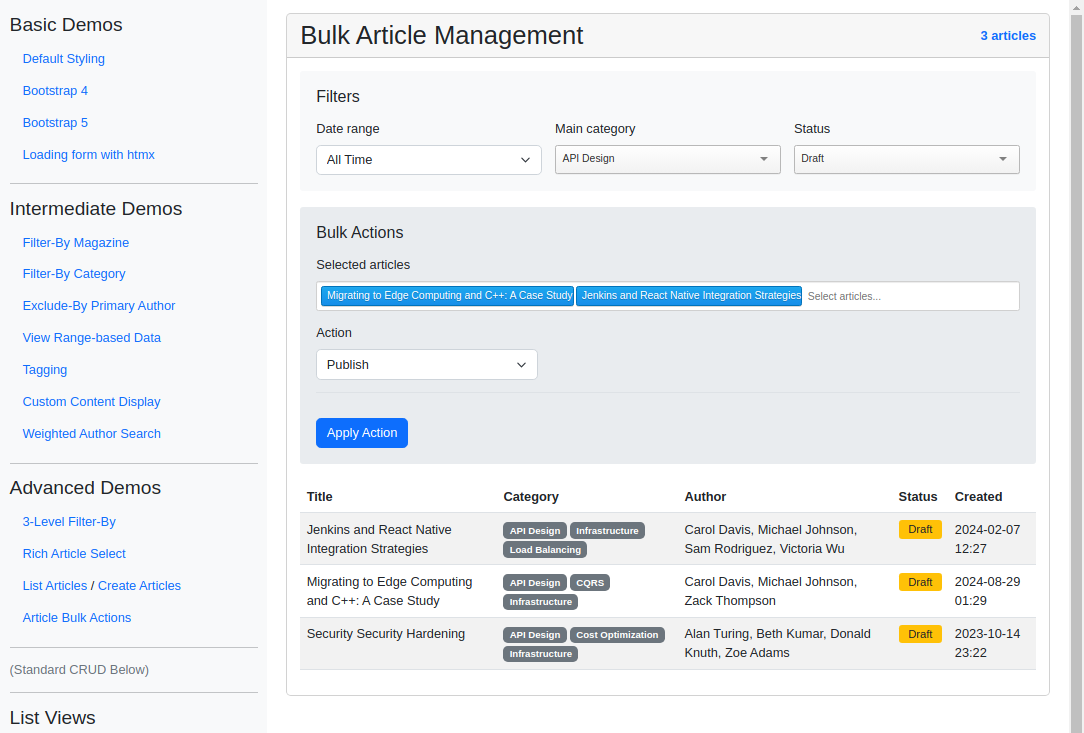
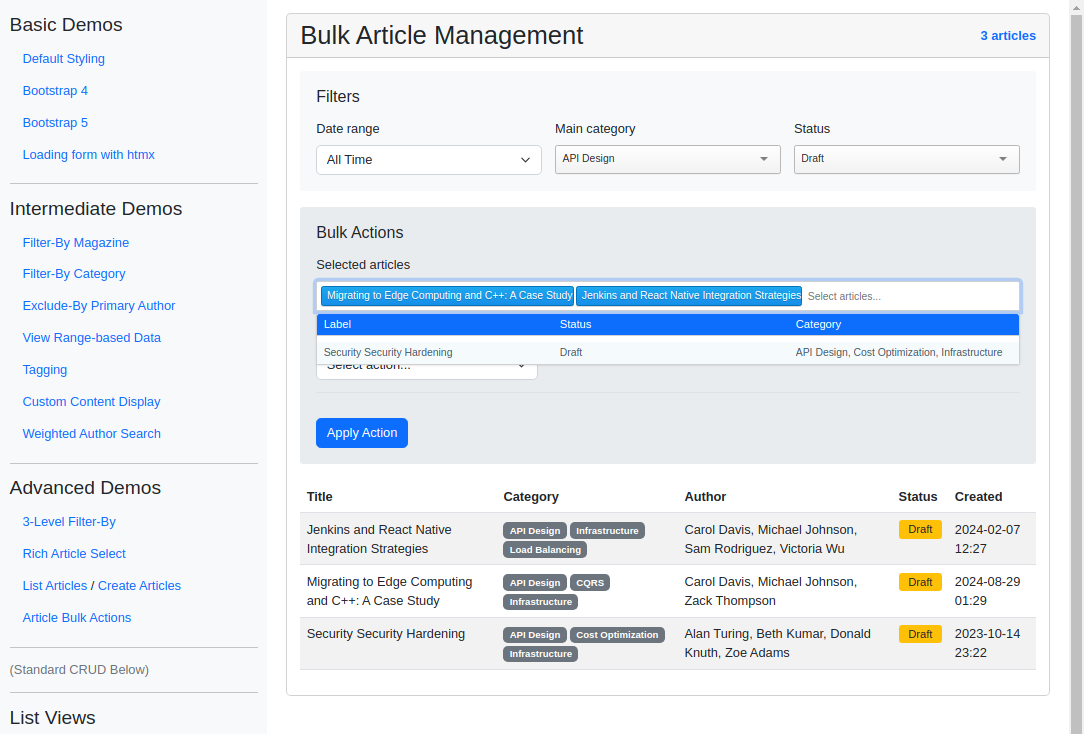
This example uses django_tomselect to select multiple articles and apply bulk actions such as publishing, archiving, or assigning categories and authors. Filters for date range, category, and status dynamically narrow the multi-select list, and the action-specific fields appear only when relevant. Use this pattern for editorial or moderation tools that operate on many records at once.
Visual Examples
Key Code Segments
Forms
The bulk action form combines filters and actions with dynamic dropdowns for flexible workflows.
Article Bulk Action Form
class ArticleBulkActionForm(forms.Form):
    """Form for bulk article management."""

    date_range = forms.ChoiceField(
        required=False,
        choices=[
            ("all", _("All Time")),
            ("today", _("Today")),
            ("week", _("Past Week")),
            ("month", _("Past Month")),
            ("quarter", _("Past Quarter")),
            ("year", _("Past Year")),
        ],
        initial="all",
        widget=forms.Select(attrs={"class": "form-select"}),
    )

    main_category = TomSelectModelChoiceField(
        required=False,
        config=TomSelectConfig(
            url="autocomplete-category",
            value_field="id",
            label_field="name",
            placeholder=_("Filter by category..."),
            highlight=True,
            plugin_dropdown_header=PluginDropdownHeader(
                title=_("Categories"),
                extra_columns={
                    "total_articles": _("Total Articles"),
                },
            ),
        ),
    )

    status = TomSelectChoiceField(
        required=False,
        config=TomSelectConfig(
            url="autocomplete-article-status",
            value_field="value",
            label_field="label",
            placeholder=_("Filter by status..."),
            highlight=True,
            preload="focus",
        ),
    )

    def __init__(self, *args, **kwargs):
        """Initialize form and update selected_articles config with current filters."""
        super().__init__(*args, **kwargs)

        # Get initial filter values from kwargs or form data
        data = kwargs.get("data") or kwargs.get("initial", {})
        date_range = data.get("date_range", "all")
        main_category = data.get("main_category", "")
        status = data.get("status", "")

        # Build the autocomplete_params string
        params = []
        if date_range and date_range != "all":
            params.append(f"date_range={date_range}")
        if main_category:
            params.append(f"main_category={main_category}")
        if status:
            params.append(f"status={status}")

        autocomplete_params = "&".join(params)

        # Create the selected_articles field with dynamic filtering
        self.fields["selected_articles"] = TomSelectModelMultipleChoiceField(
            required=False,
            config=TomSelectConfig(
                url="autocomplete-article",
                value_field="id",
                label_field="title",
                placeholder=_("Select articles..."),
                highlight=True,
                max_items=None,
                plugin_dropdown_header=PluginDropdownHeader(
                    title=_("Articles"),
                    extra_columns={
                        "status": _("Status"),
                        "category": _("Category"),
                    },
                ),
                # Pass filter parameters via attrs
                attrs={
                    "autocomplete_params": autocomplete_params,
                    "data-depends-on": "date_range,main_category,status",  # Fields this depends on
                    "class": "tomselect-with-filters",  # Class for easy JS targeting
                },
            ),
        )

    action = forms.ChoiceField(
        choices=[
            ("", _("Select action...")),
            ("publish", _("Publish")),
            ("archive", _("Archive")),
            ("change_category", _("Change Category")),
            ("assign_author", _("Assign Author")),
        ],
        required=False,
        widget=forms.Select(attrs={"class": "form-select"}),
    )

    target_category = TomSelectModelChoiceField(
        required=False,
        config=TomSelectConfig(
            url="autocomplete-category",
            value_field="id",
            label_field="name",
            placeholder=_("Select target category..."),
        ),
    )

    target_author = TomSelectModelChoiceField(
        required=False,
        config=TomSelectConfig(
            url="autocomplete-author",
            value_field="id",
            label_field="name",
            placeholder=_("Select target author..."),
        ),
    )

    def clean(self):
        """Validate that the necessary fields are provided based on the selected action."""
        cleaned_data = super().clean()
        action = cleaned_data.get("action")
        selected_articles = cleaned_data.get("selected_articles")

        if action and not selected_articles:
            raise ValidationError(_("Please select at least one article"))

        if action == "change_category" and not cleaned_data.get("target_category"):
            raise ValidationError(_("Please select a target category"))

        if action == "assign_author" and not cleaned_data.get("target_author"):
            raise ValidationError(_("Please select a target author"))

        return cleaned_data
Templates
The form is rendered dynamically in the template, allowing users to filter articles and apply actions. When filters change, the article list updates accordingly via HTMX.
Main Template
Bulk Action Form Template
{% extends "example/base_with_bootstrap5.html" %}

{% block extra_header %}
    {{ form.media }}
    <style>
        .filters-container {
            background-color: #f8f9fa;
            padding: 20px;
            border-radius: 4px;
            margin-bottom: 20px;
        }
        .bulk-actions-container {
            background-color: #e9ecef;
            padding: 20px;
            border-radius: 4px;
            margin-bottom: 20px;
        }
        .action-specific-fields {
            margin-top: 15px;
            padding-top: 15px;
            border-top: 1px solid #dee2e6;
        }
        .articles-container {
            margin-top: 20px;
        }
        .status-badge {
            font-size: 0.875rem;
            padding: 0.25rem 0.75rem;
            border-radius: 0.25rem;
        }
        .article-count {
            font-weight: bold;
            color: #0d6efd;
        }
    </style>
{% endblock %}

{% block content %}
<div class="card">
    <div class="card-header d-flex justify-content-between align-items-center">
        <h2 class="mb-0">Bulk Article Management</h2>
        <span class="article-count" id="article-count">{{ paginator.count }} articles</span>
    </div>
    <div class="card-body">
        <!-- Filters -->
        <div class="filters-container">
            <h3 class="h5 mb-3">Filters</h3>
            <form id="filter-form"
                  class="row g-3"
                  hx-get="{% url 'article-filtered-table' %}"
                  hx-target="#articles-table"
                  hx-trigger="change from:select"
                  hx-push-url="true">
                <div class="col-md-4">
                    <label for="{{ form.date_range.id_for_label }}" class="form-label">{{ form.date_range.label }}</label>
                    {{ form.date_range }}
                </div>
                <div class="col-md-4">
                    <label for="{{ form.main_category.id_for_label }}" class="form-label">{{ form.main_category.label }}</label>
                    {{ form.main_category }}
                </div>
                <div class="col-md-4">
                    <label for="{{ form.status.id_for_label }}" class="form-label">{{ form.status.label }}</label>
                    {{ form.status }}
                </div>
            </form>
        </div>

        <!-- Hidden form for tracking filter state -->
        <form id="active-filters" style="display: none;">
            <input type="hidden" name="date_range" value="{{ current_filters.date_range|default:'all' }}">
            <input type="hidden" name="main_category" value="{{ current_filters.main_category|default:'' }}">
            <input type="hidden" name="status" value="{{ current_filters.status|default:'' }}">
        </form>

        <!-- Bulk Actions -->
        <div class="bulk-actions-container">
            <h3 class="h5 mb-3">Bulk Actions</h3>
            <form method="post" action="{% url 'article-bulk-action' %}">
                {% csrf_token %}

                <div class="mb-3">
                    <label for="{{ form.selected_articles.id_for_label }}" class="form-label">{{ form.selected_articles.label }}</label>
                    {{ form.selected_articles }}
                    {% if form.selected_articles.errors %}
                        <div class="alert alert-danger mt-2">
                            {{ form.selected_articles.errors }}
                        </div>
                    {% endif %}
                </div>

                <div class="row">
                    <div class="col-md-4">
                        <label for="{{ form.action.id_for_label }}" class="form-label">{{ form.action.label }}</label>
                        {{ form.action }}
                        {% if form.action.errors %}
                            <div class="alert alert-danger mt-2">
                                {{ form.action.errors }}
                            </div>
                        {% endif %}
                    </div>
                </div>

                <div class="action-specific-fields">
                    <div class="mb-3">
                        <label for="{{ form.target_category.id_for_label }}" class="form-label">{{ form.target_category.label }}</label>
                        {{ form.target_category }}
                        {% if form.target_category.errors %}
                            <div class="alert alert-danger mt-2">
                                {{ form.target_category.errors }}
                            </div>
                        {% endif %}
                    </div>

                    <div class="mb-3">
                        <label for="{{ form.target_author.id_for_label }}" class="form-label">{{ form.target_author.label }}</label>
                        {{ form.target_author }}
                        {% if form.target_author.errors %}
                            <div class="alert alert-danger mt-2">
                                {{ form.target_author.errors }}
                            </div>
                        {% endif %}
                    </div>
                </div>

                <div class="mt-3">
                    <button type="submit" class="btn btn-primary">Apply Action</button>
                </div>

                {% if form.non_field_errors %}
                    <div class="alert alert-danger mt-3">
                        {{ form.non_field_errors }}
                    </div>
                {% endif %}
            </form>
        </div>

        <!-- Articles List -->
        {% block articles_table %}
            <div class="articles-container"
                id="articles-table"
                hx-target="this"
                hx-trigger="filtersChanged from:body"
                hx-get="{% url 'article-filtered-table' %}?{{ request.GET.urlencode }}"
                hx-include="#active-filters">
                <div class="d-flex justify-content-between align-items-center mb-3">
                    <h3 class="h5 mb-0">Filtered Articles</h3>
                    <span class="article-count">{{ paginator.count }} articles</span>
                </div>
                <div class="table-responsive">
                    {% include "example/advanced_demos/articles_table.html" %}
                </div>
            </div>
        {% endblock %}
    </div>
</div>

<script>
    document.addEventListener('DOMContentLoaded', function() {
        // Handle action selection visibility
        const actionSelect = document.getElementById('id_action');
        const targetCategoryField = document.getElementById('id_target_category').closest('.mb-3');
        const targetAuthorField = document.getElementById('id_target_author').closest('.mb-3');

        function updateActionFields() {
            const selectedAction = actionSelect.value;
            targetCategoryField.style.display = 'none';
            targetAuthorField.style.display = 'none';

            if (selectedAction === 'change_category') {
                targetCategoryField.style.display = 'block';
            } else if (selectedAction === 'assign_author') {
                targetAuthorField.style.display = 'block';
            }
        }

        actionSelect.addEventListener('change', updateActionFields);
        updateActionFields();

        // Handle TomSelect URL construction and filter changes
        document.querySelectorAll('.tomselect-with-filters').forEach(select => {
            if (select.tomselect) {
                const originalFirstUrl = select.tomselect.settings.firstUrl;
                select.tomselect.settings.firstUrl = function(query) {
                    let url = originalFirstUrl(query);
                    const formData = new FormData(document.getElementById('filter-form'));
                    const params = new URLSearchParams();

                    for (let [key, value] of formData.entries()) {
                        if (value && value !== 'all') {
                            params.append(key, value);
                        }
                    }

                    const existingParams = new URLSearchParams(url.split('?')[1] || '');
                    for (let [key, value] of params) {
                        existingParams.append(key, value);
                    }

                    return `${url.split('?')[0]}?${existingParams.toString()}`;
                };
            }
        });

        // Add event listener for filter changes to reset TomSelect
        document.querySelectorAll('#filter-form select').forEach(filterSelect => {
            filterSelect.addEventListener('change', () => {
                const selectedArticlesField = document.getElementById('id_selected_articles');
                if (selectedArticlesField && selectedArticlesField.tomselect) {
                    selectedArticlesField.tomselect.clear();
                    selectedArticlesField.tomselect.clearOptions();
                    selectedArticlesField.tomselect.clearCache();
                    selectedArticlesField.tomselect.clearPagination();
                    selectedArticlesField.tomselect.load('');
                }
            });
        });
    });
</script>
{% endblock %}
Tables Template
Articles Table Template
<span id="article-count" hx-swap-oob="true" class="article-count">{{ paginator.count }} articles</span>
<table class="table table-striped table-hover">
<thead>
<tr>
<th>Title</th>
<th>Category</th>
<th>Author</th>
<th>Status</th>
<th>Created</th>
</tr>
</thead>
<tbody>
{% for article in articles|default:page_obj %}
<tr>
<td>{{ article.title }}</td>
<td>
{% for category in article.categories.all %}
<span class="badge bg-secondary">{{ category.name }}</span>
{% endfor %}
</td>
<td>
{% for author in article.authors.all %}
{{ author.name }}{% if not forloop.last %}, {% endif %}
{% endfor %}
</td>
<td>
<span class="status-badge {% if article.status == 'published' %}bg-success{% elif article.status == 'draft' %}bg-warning{% else %}bg-secondary{% endif %}">
{{ article.get_status_display }}
</span>
</td>
<td>{{ article.created_at|date:"Y-m-d H:i" }}</td>
</tr>
{% empty %}
<tr>
<td colspan="5" class="text-center">No articles match the current filters</td>
</tr>
{% endfor %}
</tbody>
</table>
{% if is_paginated %}
<nav aria-label="Page navigation" class="mt-4">
<ul class="pagination justify-content-center">
{% if page_obj.has_previous %}
<li class="page-item">
<a class="page-link" href="?page=1&{{ request.GET.urlencode }}" aria-label="First">
<span aria-hidden="true">«</span>
<span class="sr-only">First</span>
</a>
</li>
<li class="page-item">
<a class="page-link" href="?page={{ page_obj.previous_page_number }}&{{ request.GET.urlencode }}" aria-label="Previous">
Previous
</a>
</li>
{% endif %}
<li class="page-item active">
<span class="page-link">
Page {{ page_obj.number }} of {{ page_obj.paginator.num_pages }}
</span>
</li>
{% if page_obj.has_next %}
<li class="page-item">
<a class="page-link" href="?page={{ page_obj.next_page_number }}&{{ request.GET.urlencode }}" aria-label="Next">
Next
</a>
</li>
<li class="page-item">
<a class="page-link" href="?page={{ page_obj.paginator.num_pages }}&{{ request.GET.urlencode }}" aria-label="Last">
<span aria-hidden="true">»</span>
<span class="sr-only">Last</span>
</a>
</li>
{% endif %}
</ul>
</nav>
{% endif %}
Autocomplete Views
Multiple autocomplete views are used to populate the dropdowns with dynamic data, such as categories, authors, and article statuses. Please see the example app’s Autocomplete Views Code for more details.
Views
We use two views to handle the bulk actions and filtered article table. The article_bulk_action_view processes the bulk actions, while article_filtered_table returns the filtered articles table HTML.
Bulk Action View
def article_bulk_action_view(request):
    """View for bulk article management."""
    template = "example/advanced_demos/bulk_action.html"
    context = {}

    # Get current filter values from GET parameters
    date_range = request.GET.get("date_range", "all")
    main_category = request.GET.get("main_category")
    status = request.GET.get("status")

    # Build queryset with filters
    articles = Article.objects.all()

    if date_range != "all":
        now = timezone.now()
        date_filters = {
            "today": now.date(),
            "week": now - timedelta(days=7),
            "month": now - timedelta(days=30),
            "quarter": now - timedelta(days=90),
            "year": now - timedelta(days=365),
        }
        if date_range in date_filters:
            if date_range == "today":
                articles = articles.filter(created_at__date=date_filters[date_range])
            else:
                articles = articles.filter(created_at__gte=date_filters[date_range])

    if main_category:
        articles = articles.filter(categories__id=main_category)

    if status:
        articles = articles.filter(status=status)

    if request.method == "POST":
        form = ArticleBulkActionForm(request.POST)
        if form.is_valid():
            selected_articles = form.cleaned_data["selected_articles"]
            action = form.cleaned_data["action"]

            if selected_articles:
                try:
                    # Convert selected_articles to a queryset if it isn't already
                    if not isinstance(selected_articles, models.QuerySet):
                        article_ids = [art.id for art in selected_articles]
                        selected_articles = Article.objects.filter(id__in=article_ids)

                    if action == "publish":
                        selected_articles.update(status=ArticleStatus.PUBLISHED)
                        messages.success(
                            request,
                            _("{} articles published successfully").format(selected_articles.count()),
                        )

                    elif action == "archive":
                        selected_articles.update(status=ArticleStatus.ARCHIVED)
                        messages.success(
                            request,
                            _("{} articles archived successfully").format(selected_articles.count()),
                        )

                    elif action == "change_category":
                        target_category = form.cleaned_data["target_category"]
                        if target_category:
                            for article in selected_articles:
                                article.categories.clear()
                                article.categories.add(target_category)
                            messages.success(
                                request,
                                _("Category updated for {} articles").format(selected_articles.count()),
                            )

                    elif action == "assign_author":
                        target_author = form.cleaned_data["target_author"]
                        if target_author:
                            for article in selected_articles:
                                article.authors.add(target_author)
                            messages.success(
                                request,
                                _("Author assigned to {} articles").format(selected_articles.count()),
                            )

                    # Redirect to preserve filters
                    url = f"{reverse('article-bulk-action')}?{request.GET.urlencode()}"
                    return HttpResponseRedirect(url)

                except Exception as e:
                    messages.error(request, f"Error performing bulk action: {str(e)}")
        else:
            messages.error(request, "Please correct the form errors: %s" % form.errors)
    else:
        # Initialize form with current filter values
        form = ArticleBulkActionForm(
            initial={"date_range": date_range, "main_category": main_category, "status": status}
        )

    # Pagination
    paginator = Paginator(articles.distinct(), 20)
    page = request.GET.get("page", 1)

    try:
        articles_page = paginator.page(page)
    except PageNotAnInteger:
        articles_page = paginator.page(1)
    except EmptyPage:
        articles_page = paginator.page(paginator.num_pages)

    context.update(
        {
            "form": form,
            "page_obj": articles_page,
            "paginator": paginator,
            "is_paginated": paginator.num_pages > 1,
            "articles": articles_page,
            # Add current filter values to context
            "current_filters": {"date_range": date_range, "main_category": main_category, "status": status},
        }
    )

    return TemplateResponse(request, template, context)


@require_GET
def article_filtered_table(request):
    """Return the filtered articles table HTML with OOB updates."""
    template = "example/advanced_demos/articles_table.html"

    # Get filter values
    date_range = request.GET.get("date_range", "all")
    main_category = request.GET.get("main_category")
    status = request.GET.get("status")

    # Build queryset with filters
    articles = Article.objects.all()

    if date_range != "all":
        now = timezone.now()
        date_filters = {
            "today": now.date(),
            "week": now - timedelta(days=7),
            "month": now - timedelta(days=30),
            "quarter": now - timedelta(days=90),
            "year": now - timedelta(days=365),
        }
        if date_range in date_filters:
            if date_range == "today":
                articles = articles.filter(created_at__date=date_filters[date_range])
            else:
                articles = articles.filter(created_at__gte=date_filters[date_range])

    if main_category:
        articles = articles.filter(categories__id=main_category)

    if status:
        articles = articles.filter(status=status)

    articles = articles.distinct()

    # Pagination
    paginator = Paginator(articles, 20)
    page = request.GET.get("page", 1)

    try:
        articles_page = paginator.page(page)
    except PageNotAnInteger:
        articles_page = paginator.page(1)
    except EmptyPage:
        articles_page = paginator.page(paginator.num_pages)

    context = {
        "articles": articles_page,
        "is_paginated": paginator.num_pages > 1,
        "page_obj": articles_page,
        "paginator": paginator,
        "current_filters": {"date_range": date_range, "main_category": main_category, "status": status},
    }

    return TemplateResponse(request, template, context)
Implementation Notes
PluginDropdownHeaderprovides additional metadata for each dropdown (e.g., category total articles).Target fields like “Category” or “Author” are conditionally required based on the action type, ensuring flexibility.