Filter-By Magazine
Example Overview
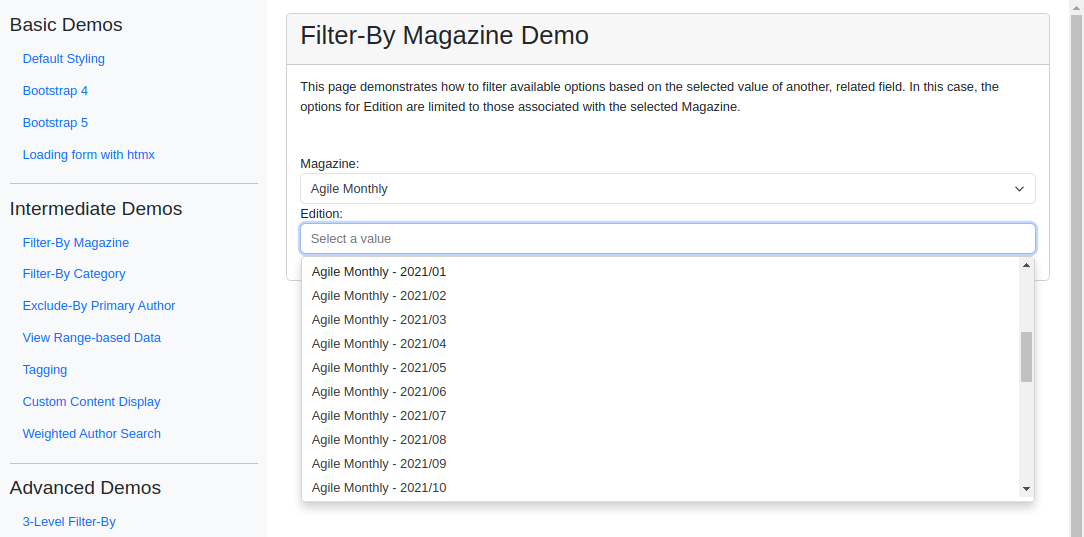
This example builds a pair of dependent dropdowns where the “Edition” field is filtered by the selected “Magazine” via the filter_by parameter. With no magazine selected the Edition dropdown stays empty; once a magazine is chosen, only editions linked to it appear. Reach for this pattern whenever one field’s options should be scoped by another, such as cascaded or conditional menus in publishing systems, location selectors, or product configurations.
Visual Examples
Key Code Segments
Forms
This example uses TomSelectModelChoiceField for both magazine and edition fields in the form. The edition field is configured with the filter_by parameter to ensure it depends on the magazine selection.
Form Definition
class FilterByMagazineForm(forms.Form):
    """Form with dependent fields demonstrating filter_by functionality."""

    magazine = TomSelectModelChoiceField(
        config=TomSelectConfig(
            url="autocomplete-magazine",
            value_field="id",
            label_field="name",
            css_framework="bootstrap5",
        ),
    )

    edition = TomSelectModelChoiceField(
        config=TomSelectConfig(
            url="autocomplete-edition",
            show_list=True,
            show_create=True,
            value_field="id",
            label_field="name",
            filter_by=("magazine", "magazine_id"),
            css_framework="bootstrap5",
            plugin_dropdown_footer=PluginDropdownFooter(),
        ),
        attrs={"class": "form-control mb-3"},
        required=False,
    )
Explanation:
The
filter_byparameter in theeditionfield dynamically narrows down options based on themagazine_idof the selected magazine.
Templates
The form is rendered in the filter_by_magazine.html template, which extends a base template with Bootstrap 5 integration. The extra_header block includes the form media and custom CSS for styling the help text.
Template Code
{% extends 'example/base_with_bootstrap5.html' %}

{% block extra_header %}
    {{ form.media }}
    <style>
        .helptext {
            font-size: 10px;
            color: #757575;
        }
    </style>
{% endblock %}

{% block content %}
    <div class="card">
        <div class="card-header">
            <h2>Filter-By Magazine Demo</h2>
        </div>
        <div class="card-body">
            <div class="pb-5">
                This page demonstrates how to filter available options based on the selected value of another, related field.
                In this case, the options for Edition are limited to those associated with the selected Magazine.
            </div>
            <form>
                {% csrf_token %}
                {{ form.as_div }}
            </form>
        </div>
    </div>
{% endblock %}
Key Elements:
Uses Bootstrap 5 for consistent styling.
Dynamically displays dropdown options using JavaScript integration with
django_tomselect.
Autocomplete Views
autocomplete-magazine and autocomplete-edition endpoints provide data for the dropdowns. These are standard AutocompleteModelViews; the filter_by parameter is applied automatically by the base view to narrow results for the dependent field - no custom view logic is required.
Note that we use skip_authorization = True to bypass the default authorization checks for simplicity in this example.
Autocomplete Views
class EditionAutocompleteView(AutocompleteModelView):
    """Autocomplete that returns all Edition objects."""

    model = Edition
    search_lookups = ["name__icontains"]
    page_size = 20
    value_fields = ["id", "name", "year", "pages", "pub_num"]

    list_url = "edition-list"
    create_url = "edition-create"
    update_url = "edition-update"
    delete_url = "edition-delete"

    skip_authorization = True


class MagazineAutocompleteView(AutocompleteModelView):
    """Autocomplete that returns all Magazine objects."""

    model = Magazine
    search_lookups = ["name__icontains"]
    value_fields = ["id", "name", "accepts_new_articles"]

    list_url = "magazine-list"
    create_url = "magazine-create"
    update_url = "magazine-update"
    delete_url = "magazine-delete"

    skip_authorization = True
Dependencies
Models:
MagazineandEditionmodels must have a foreign key relationship to enable filtering.URLs: Autocomplete views must be registered in the URL configuration.
See the Article List and Create example for a more comprehensive demonstration, which includes this functionality.