# Rich Article Select
## Example Overview
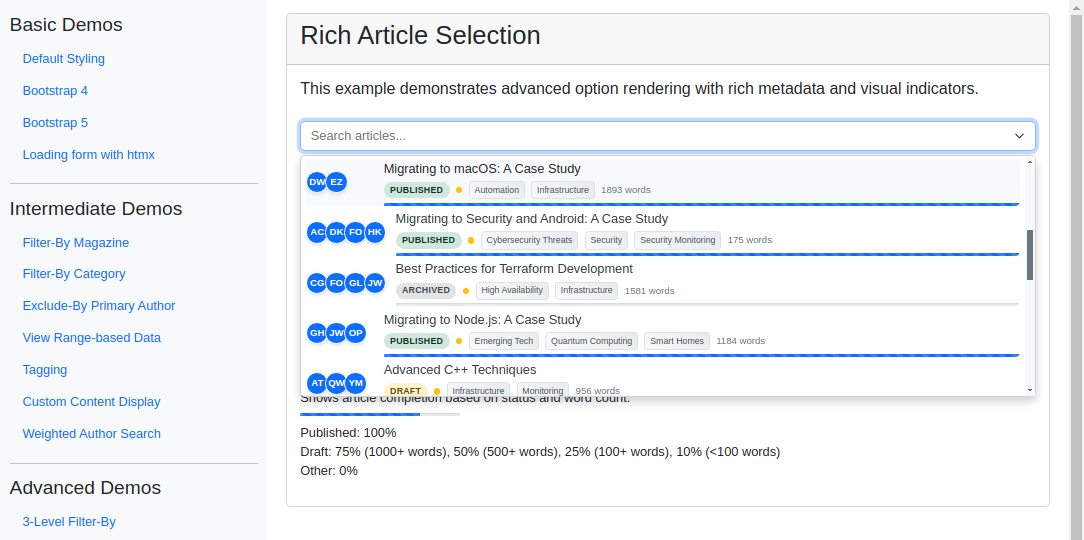
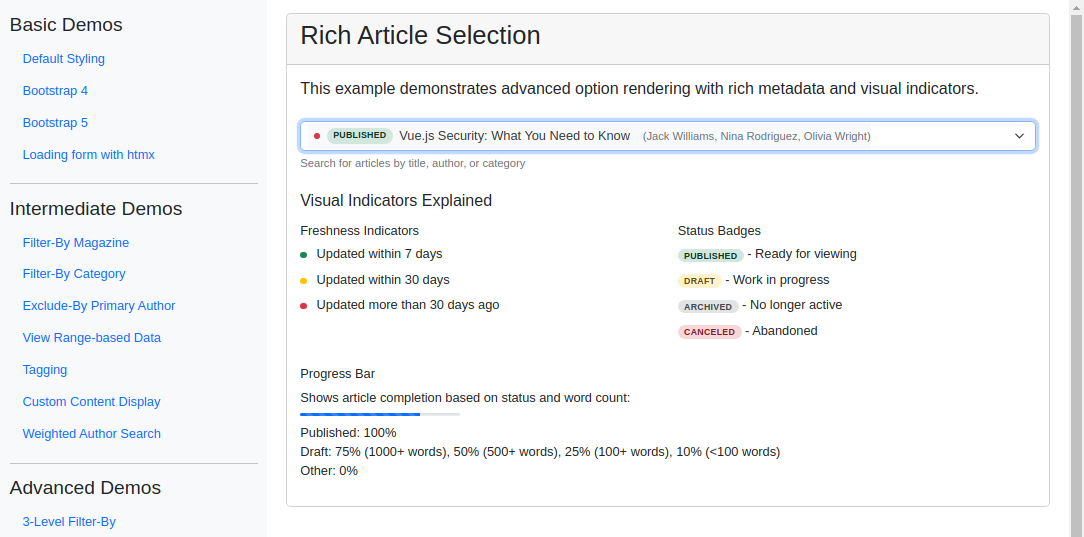
This example enriches the selection interface with a detailed, visually appealing dropdown. Each option is rendered with custom HTML - author avatars, status badges, freshness indicators, category tags, and progress bars - giving editors a comprehensive overview of each article before they select. Reach for this pattern when users need to browse and choose records based on several attributes at once.
**Visual Examples**
---
## Key Code Segments
### Forms
The form uses a `TomSelectModelChoiceField` with advanced rendering configurations. The `TomSelectConfig` object includes custom HTML templates for rendering options and selected items, allowing detailed metadata to be displayed in the dropdown.
The option template is included as a multiline string within the `render` attribute of the `attrs` dictionary. It uses JavaScript template literals to define the structure of each option, including author avatars, status badges, category tags, and progress bars.
:::{admonition} Form Definition
:class: dropdown
```python
class RichArticleSelectForm(forms.Form):
"""Form demonstrating rich article selection interface."""
article = TomSelectModelChoiceField(
config=TomSelectConfig(
url="autocomplete-rich-article",
value_field="id",
label_field="title",
placeholder=_("Search articles..."),
highlight=True,
preload=True,
minimum_query_length=1,
css_framework="bootstrap5",
attrs={
"render": {
"option": """
`
${data.authors.map(author => `
${escape(author.initials)}
`).join('')}
${escape(data.title)}
${escape(data.status_display)}
${data.categories.map(cat => `
${escape(cat.name)}
`).join('')}
${escape(data.word_count)} words
`
""",
}
},
),
help_text=_("Search for articles by title, author, or category"),
)
```
:::
---
### Templates
The field is rendered in the form with minimal configuration, and custom rendering is handled in the `TomSelectConfig`. A key is provided to aid in understanding the custom rendering styles.
:::{admonition} Template Code
:class: dropdown
```html
{% extends "example/base_with_bootstrap5.html" %}
{% block extra_header %}
{{ form.media }}
{% endblock %}
{% block content %}
Rich Article Selection
This example demonstrates advanced option rendering with rich metadata and visual indicators.
Visual Indicators Explained
Freshness Indicators
Updated within 7 days
Updated within 30 days
Updated more than 30 days ago
Status Badges
Published
- Ready for viewing
Draft
- Work in progress
Archived
- No longer active
Canceled
- Abandoned
Progress Bar
Shows article completion based on status and word count:
{% endblock %}
```
:::
---
### Autocomplete Views
The `autocomplete-rich-article` endpoint processes user queries and retrieves rich article data. The view includes custom search logic, queryset annotations, and result formatting to provide detailed metadata for each article.
:::{admonition} Autocomplete View
:class: dropdown
```python
class RichArticleAutocompleteView(AutocompleteModelView):
"""Autocomplete view with rich metadata for articles."""
model = Article
search_lookups = [
"title__icontains",
"authors__name__icontains",
"categories__name__icontains",
]
ordering = ["-updated_at", "title"]
page_size = 10
skip_authorization = True
def hook_queryset(self, queryset):
"""Add annotations for progress and prefetch related data."""
return (
queryset.select_related("magazine")
.prefetch_related("authors", "categories")
.annotate(
days_since_update=Now() - F("updated_at"),
completion_score=Case(
When(status="published", then=Value(100)),
When(
status="draft",
then=Case(
When(word_count__gte=1000, then=Value(75)),
When(word_count__gte=500, then=Value(50)),
When(word_count__gte=100, then=Value(25)),
default=Value(10),
),
),
default=Value(0),
output_field=IntegerField(),
),
)
.distinct()
)
def search(self, queryset, query):
"""Implement custom search that includes related fields."""
if not query:
return queryset
# Split query into terms for more flexible matching
terms = query.split()
q_objects = Q()
for term in terms:
term_q = Q()
for lookup in self.search_lookups:
term_q |= Q(**{lookup: term})
q_objects &= term_q
return queryset.filter(q_objects)
def prepare_results(self, results):
"""Format the article data with rich metadata."""
formatted_results = []
for article in results:
# Calculate article freshness
days_old = (timezone.now() - article.updated_at).days if article.updated_at else None
freshness = "recent" if days_old and days_old < 7 else "medium" if days_old and days_old < 30 else "old"
# Format authors with initials
authors_data = [
{
"name": author.name,
"initials": "".join(word[0].upper() for word in author.name.split() if word),
"article_count": author.article_set.count(),
}
for author in article.authors.all()
]
# Format categories
categories_data = [
{
"name": category.name,
"article_count": category.article_set.count(),
}
for category in article.categories.all()
]
formatted_results.append(
{
"id": article.id,
"title": article.title,
"status": article.status,
"status_display": article.get_status_display(),
"word_count": article.word_count,
"completion_score": getattr(article, "completion_score", 0),
"freshness": freshness,
"authors": authors_data,
"categories": categories_data,
"updated_at": (article.updated_at.strftime("%Y-%m-%d %H:%M") if article.updated_at else ""),
"created_at": (article.created_at.strftime("%Y-%m-%d %H:%M") if article.created_at else ""),
}
)
return formatted_results
```
:::
---
## Implementation Notes
- **Preloading**: The dropdown is preloaded when focused to enhance user experience. If the preload option is disabled, the dropdown will load results only after the user starts typing.