Weighted Author Search
Example Overview
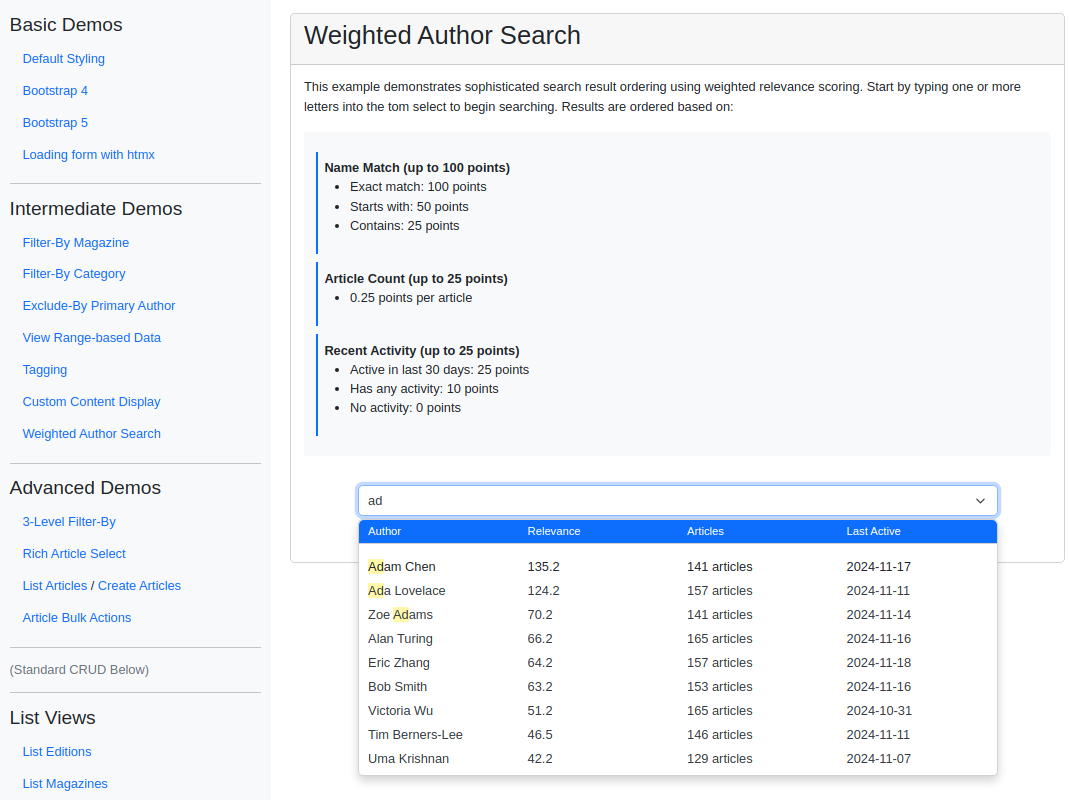
This example implements a weighted author search where results are ranked by a relevance score combining name-match quality, article count, and recent activity rather than plain alphabetical order. The list starts sorted by name and re-orders as the user types, with a PluginDropdownHeader surfacing the score and supporting metadata in extra columns. Reach for this pattern when alphabetical sorting isn’t enough and you want the most relevant records (authors, contributors, experts) to surface first.
Visual Examples
Key Code Segments
Forms
The form uses TomSelectModelChoiceField to configure the dropdown, with a PluginDropdownHeader plugin to add metadata to the search results.
Form Definition
class WeightedAuthorSearchForm(forms.Form):
    """Form demonstrating weighted author search results."""

    author = TomSelectModelChoiceField(
        config=TomSelectConfig(
            url="autocomplete-weighted-author",
            value_field="id",
            label_field="name",
            placeholder=_("Search for authors..."),
            highlight=True,
            minimum_query_length=1,
            preload=True,
            css_framework="bootstrap5",
            plugin_dropdown_header=PluginDropdownHeader(
                title=_("Author Search Results"),
                show_value_field=False,
                label_field_label=_("Author"),
                value_field_label=_("ID"),
                extra_columns={
                    "relevance_score": _("Relevance"),
                    "article_count": _("Articles"),
                    "last_active": _("Last Active"),
                },
            ),
        ),
        help_text=_("Results are ordered by name match, article count, and recent activity"),
    )
Explanation:
The
PluginDropdownHeaderplugin adds extra metadata columns (e.g., relevance score, article count) to the dropdown results.The
minimum_query_lengthandpreloadsettings ensure responsiveness and efficiency.
Templates
The form is rendered in the weighted_author_search.html template, displaying metadata for the selected author and search results.
Template Code
{% extends "example/base_with_bootstrap5.html" %}

{% block extra_header %}
    {{ form.media }}
    <style>
        .helptext {
            font-size: 12px;
            color: #6c757d;
            margin-top: 4px;
        }
        .search-container {
            max-width: 800px;
            margin: 20px auto;
        }
        .score-explanation {
            background-color: #f8f9fa;
            border-radius: 4px;
            padding: 15px;
            margin-top: 20px;
        }
        .score-component {
            margin: 10px 0;
            padding: 8px;
            border-left: 3px solid #0d6efd;
        }
    </style>
{% endblock %}

{% block content %}
<div class="card">
    <div class="card-header">
        <h2>Weighted Author Search</h2>
    </div>
    <div class="card-body">
        <div class="pb-3">
            <p>
                This example demonstrates sophisticated search result ordering using weighted relevance scoring.
                Start by typing one or more letters into the tom select to begin searching. Results are ordered based on:
            </p>
            <div class="score-explanation">
                <div class="score-component">
                    <strong>Name Match (up to 100 points)</strong>
                    <ul>
                        <li>Exact match: 100 points</li>
                        <li>Starts with: 50 points</li>
                        <li>Contains: 25 points</li>
                    </ul>
                </div>
                <div class="score-component">
                    <strong>Article Count (up to 25 points)</strong>
                    <ul>
                        <li>0.25 points per article</li>
                    </ul>
                </div>
                <div class="score-component">
                    <strong>Recent Activity (up to 25 points)</strong>
                    <ul>
                        <li>Active in last 30 days: 25 points</li>
                        <li>Has any activity: 10 points</li>
                        <li>No activity: 0 points</li>
                    </ul>
                </div>
            </div>
        </div>

        <div class="search-container">
            <form method="post">
                {% csrf_token %}
                <div class="mb-3">
                    {{ form.author }}
                    {% if form.author.help_text %}
                        <div class="helptext">{{ form.author.help_text }}</div>
                    {% endif %}
                </div>
            </form>
        </div>
    </div>
</div>
{% endblock %}
Key Elements:
The form is styled with Bootstrap 5 for a modern look.
Help text below the field explains the search prioritization criteria.
Autocomplete Views
The autocomplete-weighted-author endpoint provides the backend logic for ordering results based on weighted relevance. We use annotations to calculate relevance scores and order results accordingly.
We also hook into the result preparation process to format metadata for display and provide a richer user experience. The search method combines multiple scoring components to calculate the final relevance score.
Autocomplete View
class WeightedAuthorAutocompleteView(AutocompleteModelView):
    """Autocomplete view that returns authors ordered by weighted relevance."""

    model = Author
    search_lookups = ["name__icontains", "bio__icontains"]
    value_fields = [
        "id",
        "name",
        "bio",
        "article_count",
        "last_active",
        "relevance_score",
    ]

    skip_authorization = True

    def hook_queryset(self, queryset):
        """Add annotations for weighted search."""
        # Get base queryset with article count and last activity
        queryset = queryset.annotate(article_count=Count("article"), last_active=Max("article__updated_at"))
        return queryset

    def search(self, queryset, query):
        """Implement weighted search ordering."""

        # Calculate individual scoring components
        now = timezone.now()
        month_ago = now - timedelta(days=30)

        return (
            queryset.annotate(
                # Exact name match (highest weight)
                exact_match=Case(
                    When(name__iexact=query, then=Value(100.0)),
                    default=Value(0.0),
                    output_field=FloatField(),
                ),
                # Starts with match (high weight)
                starts_with=Case(
                    When(name__istartswith=query, then=Value(50.0)),
                    default=Value(0.0),
                    output_field=FloatField(),
                ),
                # Contains match (medium weight)
                contains=Case(
                    When(name__icontains=query, then=Value(25.0)),
                    default=Value(0.0),
                    output_field=FloatField(),
                ),
                # Article count weight (up to 25 points)
                article_weight=ExpressionWrapper(F("article_count") * Value(0.25), output_field=FloatField()),
                # Recency weight (up to 25 points)
                recency_weight=Case(
                    When(last_active__gte=month_ago, then=Value(25.0)),
                    When(last_active__isnull=False, then=Value(10.0)),
                    default=Value(0.0),
                    output_field=FloatField(),
                ),
                # Calculate final relevance score
                relevance_score=ExpressionWrapper(
                    F("exact_match") + F("starts_with") + F("contains") + F("article_weight") + F("recency_weight"),
                    output_field=FloatField(),
                ),
            )
            .filter(Q(name__icontains=query) | Q(bio__icontains=query))
            .order_by("-relevance_score", "name")
        )

    def hook_prepare_results(self, results):
        """Format the results for display."""
        for result in results:
            # Format the relevance score
            result["relevance_score"] = f"{result['relevance_score']:.1f}"

            # Format last active date
            if result.get("last_active"):
                result["last_active"] = result["last_active"].strftime("%Y-%m-%d")
            else:
                result["last_active"] = "Never"

            # Format article count
            result["article_count"] = f"{result['article_count']} articles"

        return results