Tagging Publications
Example Overview
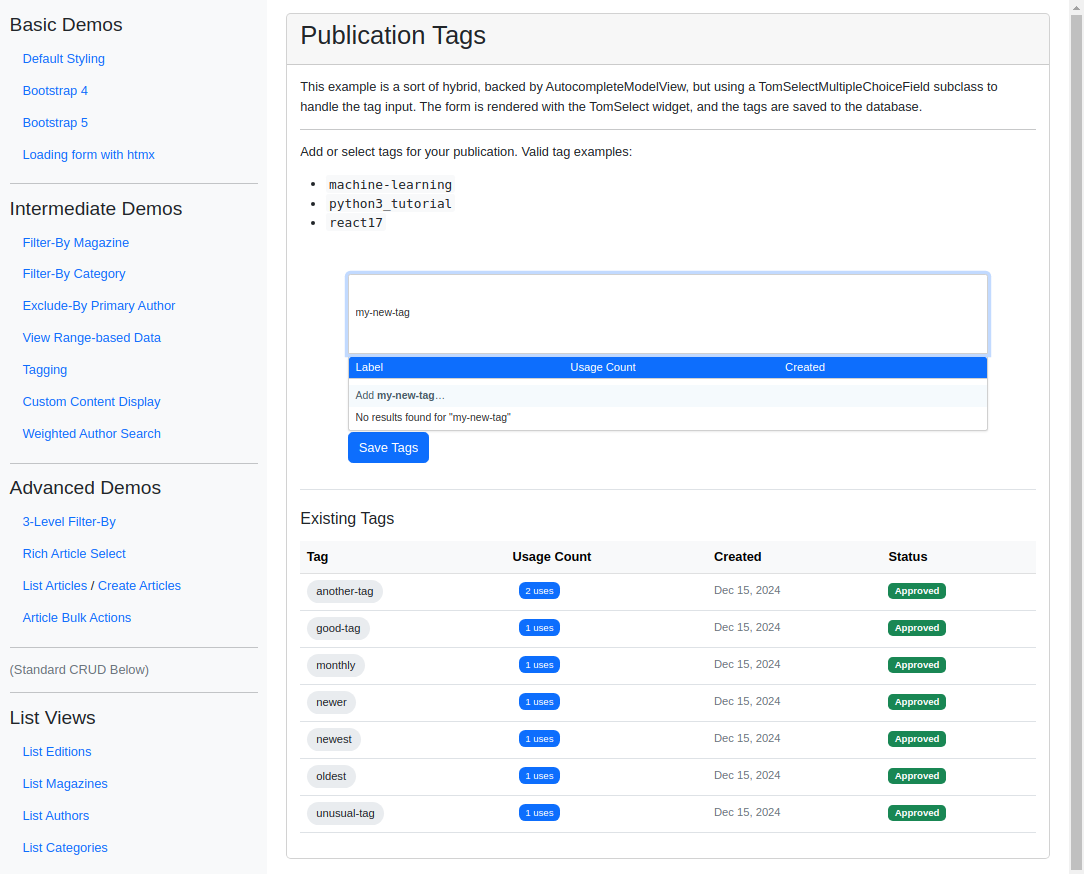
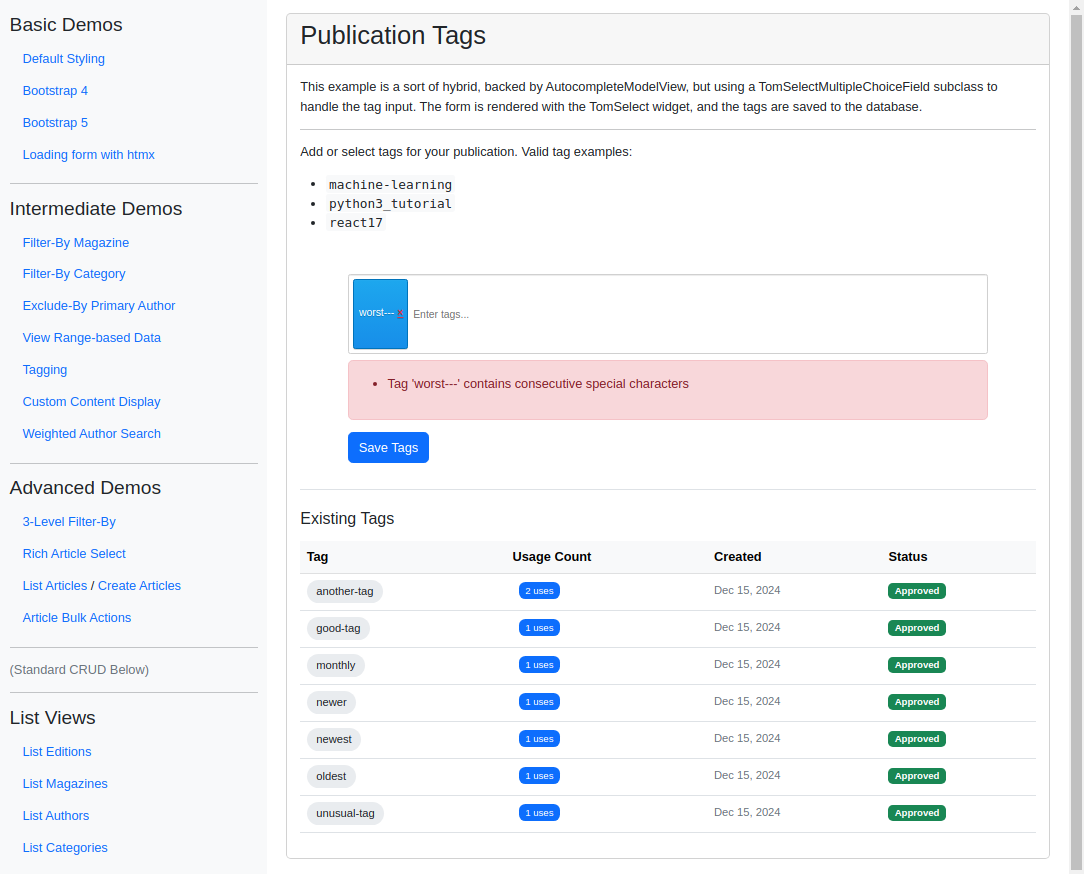
This example implements tagging in a Django form with django_tomselect. Users can autocomplete existing tags or create new ones on the fly with the create feature, and the tags are validated and saved to the database on submit. Reach for this pattern in content management systems or anywhere users generate metadata to categorize entities.
Visual Examples
Key Code Segments
Forms
The form uses a custom DynamicTagField, a subclass of TomSelectMultipleChoiceField, to allow dynamic creation and selection of tags.
The most complex part of the form is the clean_tags method, which validates and saves tags to the database.
Form Definition
class DynamicTagField(TomSelectMultipleChoiceField):
    """A custom field that allows new values to be created on the fly."""

    def clean(self, value):
        """Override to allow values that aren't in the autocomplete results yet."""
        if not value:
            if self.required:
                raise ValidationError(self.error_messages["required"], code="required")
            return []

        # Convert all values to strings
        str_values = [str(v) for v in value]
        return str_values


class TaggingForm(forms.Form):
    """Form for managing publication tags with validation."""

    tags = DynamicTagField(
        config=TomSelectConfig(
            url="autocomplete-publication-tag",
            value_field="value",
            label_field="label",
            placeholder="Enter tags...",
            highlight=True,
            create=True,
            minimum_query_length=2,
            max_items=10,
            plugin_dropdown_header=PluginDropdownHeader(
                title="Publication Tags",
                extra_columns={"usage_count": "Usage Count", "created_at": "Created"},
            ),
            plugin_remove_button=PluginRemoveButton(title="Remove tag", label="×", class_name="remove-tag"),
        ),
        help_text=(
            "Enter or select tags. Tags must be 2-50 characters long, "
            "contain only letters, numbers, hyphens, and underscores, "
            "and start/end with letters or numbers."
        ),
    )

    def clean_tags(self):
        """Validate tags and create/update them in the database."""
        tag_names = self.cleaned_data.get("tags", [])

        if len(tag_names) < 1:
            raise ValidationError("Please add at least one tag")

        if len(tag_names) > 10:
            raise ValidationError("Maximum 10 tags allowed")

        # Check for duplicates (case-insensitive)
        lower_names = [name.lower() for name in tag_names]
        if len(lower_names) != len(set(lower_names)):
            raise ValidationError("Duplicate tags are not allowed")

        # Process each tag
        tags = []
        for name in tag_names:
            # Clean the tag name
            name = name.lower().strip()

            # Validate the tag format
            if len(name) < 2:
                raise ValidationError(f"Tag {name!r} is too short")

            if not all(c.isalnum() or c in "-_" for c in name):
                raise ValidationError(f"Tag {name!r} contains invalid characters")

            if "--" in name or "__" in name:
                raise ValidationError(f"Tag {name!r} contains consecutive special characters")

            if not name[0].isalnum() or not name[-1].isalnum():
                raise ValidationError(f"Tag {name!r} must start and end with a letter or number")

            # Try to get existing tag or create new one
            tag, _ = PublicationTag.objects.get_or_create(
                name=name,
                defaults={"is_approved": True},
            )
            tags.append(tag)

        return tags
Explanation:
The
DynamicTagFieldallows users to add new tags on the fly.The
clean_tagsmethod ensures all tags are validated and saved to the database.
Templates
The form is rendered in the tagging_publication.html template, providing an intuitive interface for managing tags.
Main Template
{% extends 'example/base_with_bootstrap5.html' %}
{% block extra_header %}
    {{ form.media.css }}
    {{ form.media.js }}
    <!-- X -->
    <style>
        .tag-input-container {
            max-width: 800px;
            margin: 20px auto;
        }
        .helptext {
            font-size: 12px;
            color: #6c757d;
            margin-top: 4px;
        }
        .ts-control {
            min-height: 100px;
        }
        .remove-tag {
            color: #dc3545;
            font-weight: bold;
            padding: 0 4px;
        }
        .tag-example {
            font-family: monospace;
            background: #f8f9fa;
            padding: 2px 4px;
            border-radius: 3px;
        }
        .tag-pill {
            font-size: 0.875rem;
            padding: 0.25rem 0.75rem;
            border-radius: 1rem;
            background-color: #e9ecef;
            display: inline-block;
            margin-right: 0.25rem;
        }
        .usage-badge {
            font-size: 0.75rem;
            background-color: #0d6efd;
            color: white;
            padding: 0.25rem 0.5rem;
            border-radius: 0.5rem;
            margin-left: 0.5rem;
        }
        .tag-date {
            color: #6c757d;
            font-size: 0.875rem;
        }
        .existing-tags {
            margin-top: 2rem;
            border-top: 1px solid #dee2e6;
            padding-top: 1.5rem;
        }
    </style>
{% endblock %}

{% block content %}
<div class="card">
    <div class="card-header">
        <h2>Publication Tags</h2>
    </div>
    <div class="card-body">
        <div class="pb-3">
            <p>
                This example is a sort of hybrid, backed by AutocompleteModelView, but using a TomSelectMultipleChoiceField
                subclass to handle the tag input. The form is rendered with the TomSelect widget, and the tags are
                saved to the database.
            </p>
            <hr>
            <p>Add or select tags for your publication. Valid tag examples:</p>
            <ul>
                <li><span class="tag-example">machine-learning</span></li>
                <li><span class="tag-example">python3_tutorial</span></li>
                <li><span class="tag-example">react17</span></li>
            </ul>
        </div>

        <div class="tag-input-container">
            <form method="post">
                {% csrf_token %}
                <div class="mb-3">
                    {{ form.tags }}
                    {% if form.tags.errors %}
                        <div class="alert alert-danger mt-2">
                            {{ form.tags.errors }}
                        </div>
                    {% endif %}
                </div>
                <button type="submit" class="btn btn-primary">Save Tags</button>
            </form>
        </div>

        {% if existing_tags %}
        <div class="existing-tags">
            <h3 class="h5 mb-3">Existing Tags</h3>
            <div class="table-responsive">
                <table class="table table-hover">
                    <thead class="table-light">
                        <tr>
                            <th>Tag</th>
                            <th>Usage Count</th>
                            <th>Created</th>
                            <th>Status</th>
                        </tr>
                    </thead>
                    <tbody>
                        {% for tag in existing_tags %}
                        <tr>
                            <td>
                                <span class="tag-pill">{{ tag.name }}</span>
                            </td>
                            <td>
                                <span class="usage-badge">{{ tag.usage_count }} uses</span>
                            </td>
                            <td>
                                <span class="tag-date">{{ tag.created_at|date:"M j, Y" }}</span>
                            </td>
                            <td>
                                {% if tag.is_approved %}
                                    <span class="badge bg-success">Approved</span>
                                {% else %}
                                    <span class="badge bg-warning text-dark">Pending</span>
                                {% endif %}
                            </td>
                        </tr>
                        {% endfor %}
                    </tbody>
                </table>
            </div>
        </div>
        {% endif %}
    </div>
</div>
{% endblock %}
Upon form submission, the clean_tags method is called to validate and save the tags to the database. If successful, the user is shown a success page; otherwise, the form is re-rendered with error messages.
Success Template
{% extends 'example/base_with_bootstrap5.html' %}

{% block extra_header %}
    <style>
        .success-container {
            max-width: 800px;
            margin: 20px auto;
        }
        .tag-badge {
            font-size: 0.9rem;
            margin: 0.25rem;
            padding: 0.5rem 0.75rem;
            background-color: #e9ecef;
            border-radius: 20px;
            display: inline-block;
        }
        .tag-count {
            color: #6c757d;
            font-size: 0.875rem;
        }
    </style>
{% endblock %}

{% block content %}
<div class="card">
    <div class="card-header">
        <h2>Tags Saved Successfully</h2>
    </div>
    <div class="card-body">
        <div class="success-container">
            <h4>Selected Tags <span class="tag-count">({{ tags|length }})</span></h4>
            <div class="mt-3">
                {% for tag in tags %}
                    <span class="tag-badge">{{ tag.name }}</span>
                {% endfor %}
            </div>

            <div class="mt-4">
                <a href="{% url 'tagging' %}" class="btn btn-primary">Add More Tags</a>
                <a href="{% url 'index' %}" class="btn btn-outline-secondary ms-2">Return to Home</a>
            </div>
        </div>
    </div>
</div>
{% endblock %}
Autocomplete Views
The autocomplete-publication-tag endpoint provides tag suggestions based on user input.
In this example the form field (DynamicTagField, built on TomSelectMultipleChoiceField) drives the iterables widget, while PublicationTagAutocompleteView is a model-based view. To bridge the two, we override get_iterable so the model view also emits the {value, label} iterable shape the TomSelectIterablesWidget expects.
Autocomplete View
class PublicationTagAutocompleteView(AutocompleteModelView):
    """Autocomplete view for publication tags with iterable support."""

    model = PublicationTag
    search_lookups = ["name__icontains"]
    ordering = ["-usage_count", "name"]
    value_fields = ["id", "name", "usage_count", "created_at"]

    skip_authorization = True
    iterable = []

    def get_queryset(self):
        """Return queryset with usage statistics."""
        return super().get_queryset().filter(is_approved=True)

    def get_iterable(self):
        """Provide iterable interface for TomSelectIterablesWidget compatibility."""
        results = self.get_queryset()
        return [
            {
                "value": tag.name,  # Value used for selection
                "label": tag.name,  # Label shown in dropdown
                "usage_count": tag.usage_count,
                "created_at": tag.created_at.strftime("%Y-%m-%d"),
            }
            for tag in results
        ]

    def prepare_results(self, results):
        """Prepare results with formatted value/label pairs."""
        return [
            {
                "value": tag.name,  # Value used for selection
                "label": tag.name,  # Label shown in dropdown
                "usage_count": tag.usage_count,
                "created_at": tag.created_at.strftime("%Y-%m-%d"),
            }
            for tag in results
        ]
Views
The tagging view processes the form data and displays a success message with the selected tags.
View Code
def tagging_view(request):
    """View for managing publication tags."""
    template = "example/intermediate_demos/tagging_publication.html"
    context = {}
    if request.method == "POST":
        form = TaggingForm(request.POST)
        if form.is_valid():
            tags = form.cleaned_data["tags"]
            # Update usage counts
            for tag in tags:
                tag.usage_count += 1
                tag.save()

            template = "example/intermediate_demos/tagging_success.html"
            context["tags"] = tags
            return TemplateResponse(request, template, context)
    else:
        form = TaggingForm()

    existing_tags = PublicationTag.objects.all().order_by("-usage_count", "name")

    context["form"] = form
    context["existing_tags"] = existing_tags
    return TemplateResponse(request, template, context)