Custom Content Display
Example Overview
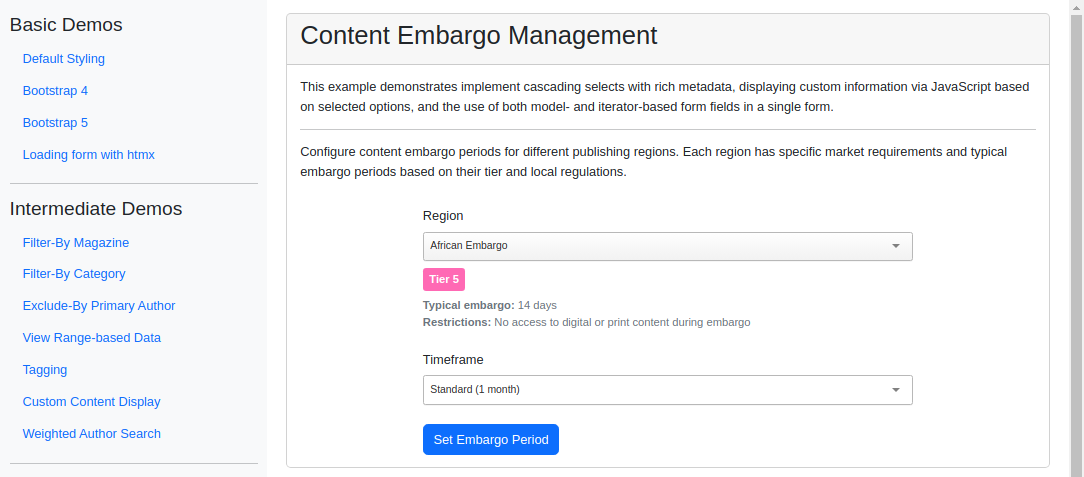
This example shows how to render custom page content in response to the items a user selects in a django_tomselect field. A JavaScript change handler reads the metadata attached to the chosen option and updates surrounding markup, which is useful whenever a selection should drive richer on-page detail beyond the dropdown itself.
Visual Examples
Key Code Segments
Forms
The form for selecting embargo regions and timeframes uses TomSelectModelChoiceField and TomSelectChoiceField to render the dropdowns.
Form Definition
class EmbargoForm(forms.Form):
    """Form for selecting embargo regions and timeframes."""

    region = TomSelectModelChoiceField(
        config=TomSelectConfig(
            url="autocomplete-embargo-region",
            value_field="id",
            label_field="name",
            placeholder="Select region...",
            highlight=True,
            preload="focus",
            plugin_dropdown_header=PluginDropdownHeader(
                title="Publishing Regions",
                extra_columns={
                    "market_tier": "Market Tier",
                    "typical_embargo_days": "Typical Days",
                },
            ),
        )
    )

    timeframe = TomSelectChoiceField(
        config=TomSelectConfig(
            url="autocomplete-embargo-timeframe",
            value_field="value",
            label_field="label",
            placeholder="Select timeframe...",
            highlight=True,
        )
    )
Templates
The template for the content embargo management page uses custom CSS classes to style additional information based on the selected region.
Template Code
{% extends 'example/base_with_bootstrap5.html' %}

{% block extra_header %}
    {{ form.media }}
    <style>
        .tier-badge {
            display: inline-block;
            padding: 0.25rem 0.5rem;
            border-radius: 0.25rem;
            font-size: 0.875rem;
            font-weight: 600;
        }
        .tier-1 { background-color: #ffd700; color: #000; }
        .tier-2 { background-color: #c0c0c0; color: #000; }
        .tier-3 { background-color: #cd7f32; color: #fff; }
        .tier-4 { background-color: #000; color: #fff; }
        .tier-5 { background-color: #ff69b4; color: #fff; }
        .tier-6 { background-color: #00f; color: #fff; }
        .tier-7 { background-color: #008000; color: #fff; }
        .tier-8 { background-color: #9400d3; color: #fff; }
        .restrictions-note {
            font-size: 0.875rem;
            color: #6c757d;
            margin-top: 0.5rem;
        }
    </style>
{% endblock %}

{% block content %}
<div class="card">
    <div class="card-header">
        <h2>Content Embargo Management</h2>
    </div>
    <div class="card-body">
        <div class="pb-3">
            <p>
                This example demonstrates implement cascading selects with rich metadata, displaying custom information
                via JavaScript based on selected options, and the use of both model- and iterator-based form fields in
                a single form.
            </p>
            <hr>
            <p>
                Configure content embargo periods for different publishing regions. Each region has specific
                market requirements and typical embargo periods based on their tier and local regulations.
            </p>
        </div>

        <form method="post" class="col-md-8 mx-auto">
            {% csrf_token %}

            <div class="mb-4">
                <label class="form-label">{{ form.region.label }}</label>
                {{ form.region }}
                <div class="restrictions-note" id="regionInfo"></div>
            </div>

            <div class="mb-4">
                <label class="form-label">{{ form.timeframe.label }}</label>
                {{ form.timeframe }}
            </div>

            <button type="submit" class="btn btn-primary">Set Embargo Period</button>
        </form>
    </div>
</div>

<script>
document.addEventListener('DOMContentLoaded', function() {
    const regionSelect = document.querySelector('#id_region').tomselect;
    const infoDiv = document.querySelector('#regionInfo');

    regionSelect.on('change', function(value) {
        const option = regionSelect.options[value];
        if (option) {
            infoDiv.innerHTML = `
                <span class="tier-badge tier-${option.market_tier.slice(-1)}">
                    ${option.market_tier}
                </span>
                <div class="mt-2">
                    <strong>Typical embargo:</strong> ${option.typical_embargo_days} days<br>
                    <strong>Restrictions:</strong> ${option.content_restrictions}
                </div>
            `;
        }
    });
});
</script>
{% endblock %}
Autocomplete Views
The autocomplete-embargo-region endpoint provides the necessary data for the display. Here we override the hook_prepare_results method to format the response with additional fields.
Autocomplete View
class EmbargoRegionAutocompleteView(AutocompleteModelView):
    """Autocomplete view for embargo regions."""

    model = EmbargoRegion
    search_lookups = ["name__icontains"]
    value_fields = [
        "id",
        "name",
        "market_tier",
        "typical_embargo_days",
        "content_restrictions",
    ]

    skip_authorization = True

    def hook_prepare_results(self, results: list[dict[str, Any]]) -> list[dict[str, Any]]:
        """Format results with tier information and restrictions."""
        formatted_results = []
        for region in results:
            formatted_results.append(
                {
                    "id": region["id"],
                    "name": str(region["name"]),
                    "market_tier": f"Tier {region['market_tier']}",
                    "typical_embargo_days": region["typical_embargo_days"],
                    "content_restrictions": region["content_restrictions"],
                }
            )
        return formatted_results
Views
The view for managing embargoes processes the form data and displays a success message with the selected region and timeframe.
View Code
def embargo_management_view(request):
    """View for managing embargoes."""
    template = "example/intermediate_demos/embargo_management.html"
    context = {}

    form = EmbargoForm()

    if request.method == "POST":
        form = EmbargoForm(request.POST)
        if form.is_valid():
            region = form.cleaned_data["region"]
            timeframe = form.cleaned_data["timeframe"]

            def get_timeframe_display(timeframe):
                """Get the display value for the timeframe."""
                return dict(EmbargoTimeframe.choices)[timeframe]

            messages.success(
                request,
                f"Embargo for {region} set to {get_timeframe_display(timeframe)}.",
            )
            return redirect("custom-content")

    context["form"] = form
    return TemplateResponse(request, template, context)