List and Create Articles
Example Overview
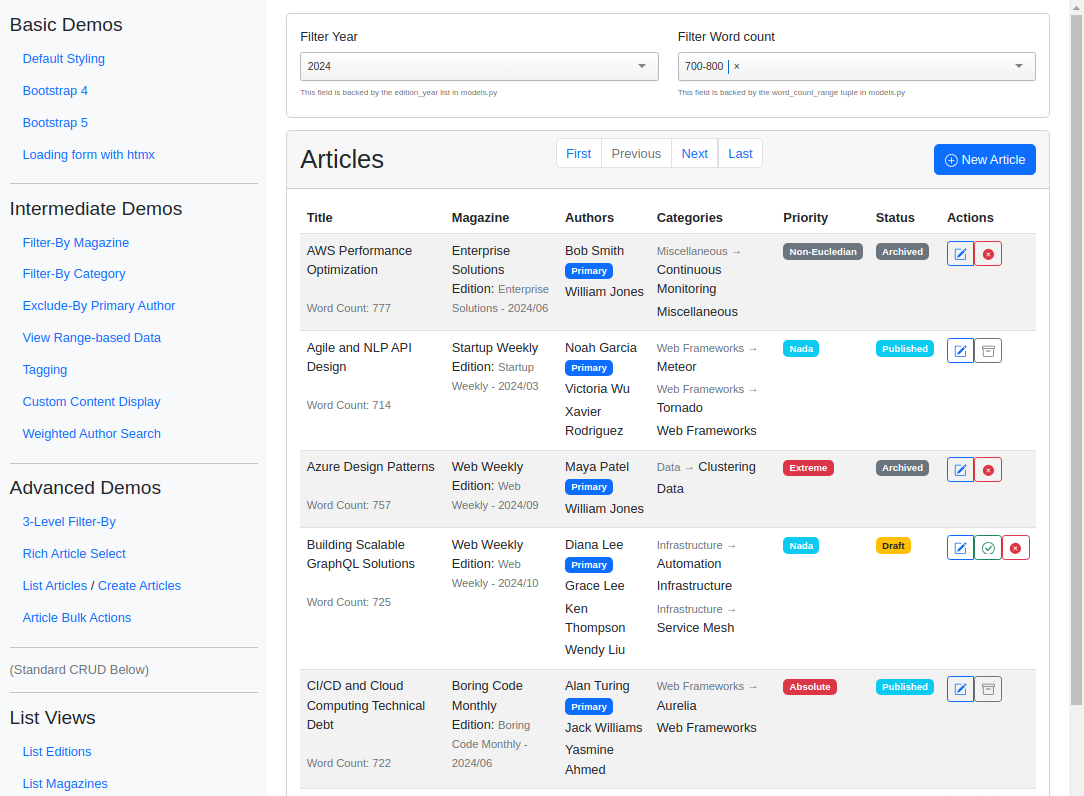
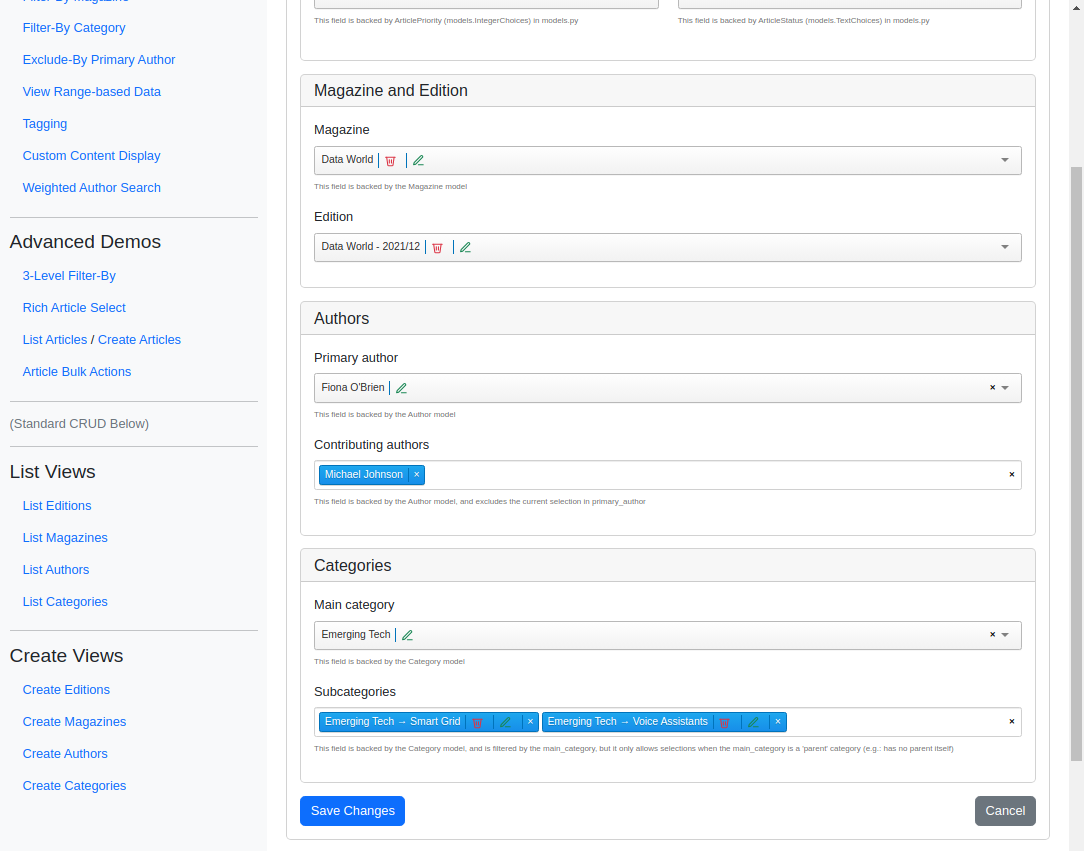
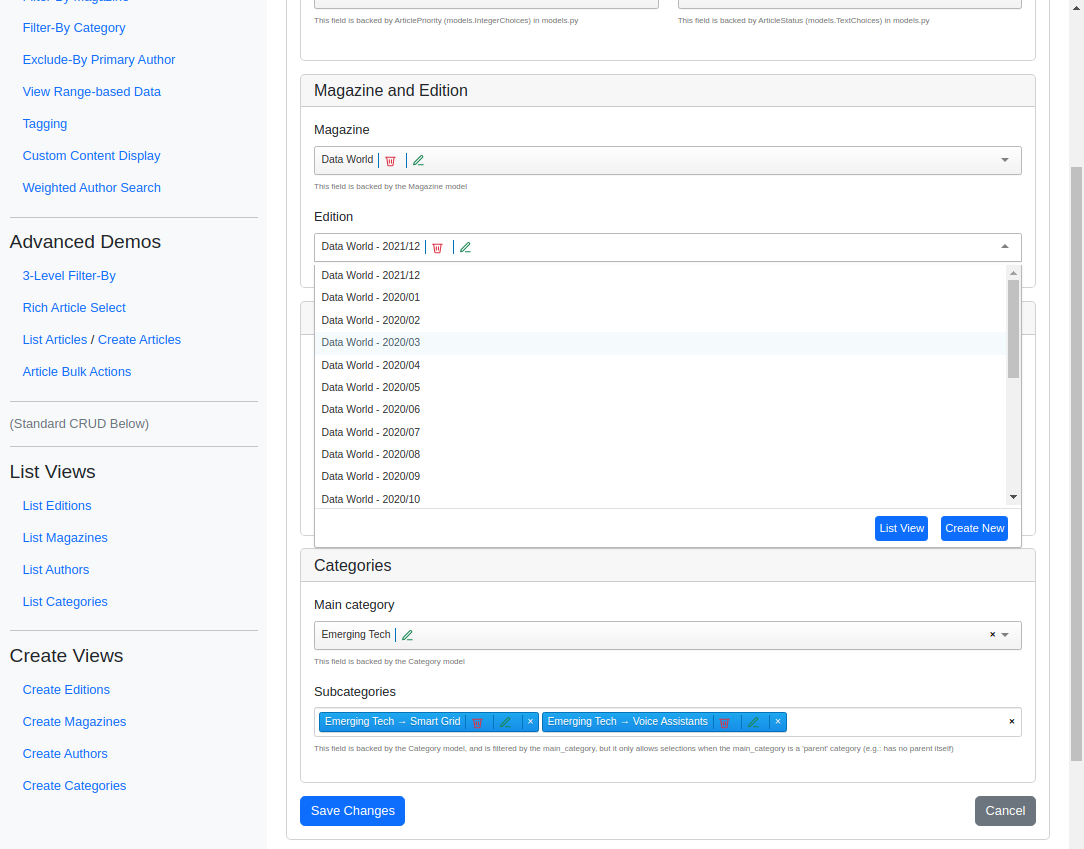
This comprehensive example wires django_tomselect into a full article workflow. The list view filters articles by edition year and word count using iterable-backed fields, while the create/update form manages relationships to magazines, editions, authors, and categories with model-backed fields, plugins, and filter_by/exclude_by dependencies. Reach for this pattern when you need a realistic, feature-rich form alongside dynamic list filtering.
Visual Examples
Key Code Segments
Forms
List Articles Filters
The filtering form utilizes TomSelectChoiceField for selecting year and word count ranges.
Form Definition
class EditionYearForm(forms.Form):
    """Form for selecting an edition year."""

    def __init__(self, *args, **kwargs):
        super().__init__(*args, **kwargs)
        self.fields["year"].help_text = "This field is backed by the edition_year list in models.py"

    year = TomSelectChoiceField(
        config=TomSelectConfig(
            url="autocomplete-edition-year",
            value_field="value",
            label_field="label",
            placeholder=_("Select an edition year..."),
            preload="focus",
            highlight=True,
            minimum_query_length=0,
        ),
    )


class WordCountForm(forms.Form):
    """Form for selecting a word count range."""

    def __init__(self, *args, **kwargs):
        super().__init__(*args, **kwargs)
        self.fields["word_count"].help_text = "This field is backed by the word_count_range tuple in models.py"

    word_count = TomSelectChoiceField(
        config=TomSelectConfig(
            url="autocomplete-page-count",
            value_field="value",
            label_field="label",
            placeholder=_("Select a word count range..."),
            preload="focus",
            highlight=True,
            minimum_query_length=0,
            plugin_remove_button=PluginRemoveButton(),
        ),
    )
Create Article Form
The “Create Article” form employs TomSelectModelChoiceField and TomSelectModelMultipleChoiceField to manage relationships like authors, categories, and more.
Form Definition
category_header = PluginDropdownHeader(
    title=_("Category Selection"),
    show_value_field=False,
    extra_columns={
        "parent_name": _("Parent"),
        "direct_articles": _("Direct Articles"),
        "total_articles": _("Total Articles"),
    },
)

author_header = PluginDropdownHeader(
    title=_("Author Selection"),
    show_value_field=False,
    extra_columns={
        "article_count": _("Articles"),
    },
)


class DynamicArticleForm(forms.ModelForm):
    """Form for creating and editing articles with dynamic fields and dependencies."""

    title = forms.CharField(max_length=200, widget=forms.TextInput(attrs={"class": "form-control"}))
    word_count = forms.IntegerField(widget=forms.NumberInput(attrs={"class": "form-control"}), min_value=0)

    status = TomSelectChoiceField(
        config=TomSelectConfig(
            url="autocomplete-article-status",
            value_field="value",
            label_field="label",
            placeholder=_("Select an article status..."),
            preload="focus",
            highlight=True,
            minimum_query_length=0,
        ),
    )

    priority = TomSelectChoiceField(
        config=TomSelectConfig(
            url="autocomplete-article-priority",
            value_field="value",
            label_field="label",
            placeholder=_("Select an article priority..."),
            preload="focus",
            highlight=True,
            minimum_query_length=0,
        ),
    )

    magazine = TomSelectModelChoiceField(
        config=TomSelectConfig(
            url="autocomplete-magazine",
            show_list=True,
            show_create=True,
            show_update=True,
            show_delete=True,
            value_field="id",
            label_field="name",
            placeholder=_("Select a magazine..."),
            preload="focus",
            highlight=True,
            minimum_query_length=0,
            plugin_dropdown_footer=PluginDropdownFooter(),
        ),
    )

    primary_author = TomSelectModelChoiceField(
        config=TomSelectConfig(
            url="autocomplete-author",
            show_list=True,
            show_create=True,
            show_update=True,
            value_field="id",
            label_field="name",
            placeholder=_("Select primary author..."),
            highlight=True,
            plugin_dropdown_header=author_header,
            plugin_dropdown_footer=PluginDropdownFooter(),
            plugin_dropdown_input=PluginDropdownInput(),
            plugin_clear_button=PluginClearButton(title=_("Clear primary author")),
        ),
    )

    contributing_authors = TomSelectModelMultipleChoiceField(
        config=TomSelectConfig(
            url="autocomplete-author",
            value_field="id",
            label_field="name",
            exclude_by=("primary_author", "id"),  # Exclude primary author
            placeholder=_("Select contributing authors..."),
            highlight=True,
            max_items=None,
            plugin_dropdown_header=author_header,
            plugin_dropdown_input=PluginDropdownInput(),
            plugin_clear_button=PluginClearButton(title=_("Clear all contributing authors")),
            plugin_remove_button=PluginRemoveButton(),
        ),
    )

    main_category = TomSelectModelChoiceField(
        config=TomSelectConfig(
            url="autocomplete-category",
            show_list=True,
            show_detail=True,
            show_delete=True,
            show_create=True,
            show_update=True,
            value_field="id",
            label_field="name",
            placeholder=_("Select main category..."),
            highlight=True,
            plugin_dropdown_header=category_header,
            plugin_dropdown_footer=PluginDropdownFooter(),
            plugin_dropdown_input=PluginDropdownInput(),
            plugin_clear_button=PluginClearButton(title=_("Clear main category")),
        ),
    )

    subcategories = TomSelectModelMultipleChoiceField(
        config=TomSelectConfig(
            url="autocomplete-category",
            value_field="id",
            label_field="full_path",
            show_update=True,
            show_delete=True,
            filter_by=("main_category", "parent_id"),
            placeholder=_("Select subcategories..."),
            highlight=True,
            max_items=None,
            plugin_dropdown_header=category_header,
            plugin_dropdown_input=PluginDropdownInput(),
            plugin_clear_button=PluginClearButton(title=_("Clear all subcategories")),
            plugin_remove_button=PluginRemoveButton(),
        ),
    )

    def __init__(self, *args, **kwargs):
        super().__init__(*args, **kwargs)

        # Set help text for fields
        self.fields["status"].help_text = "This field is backed by ArticleStatus (models.TextChoices) in models.py"
        self.fields["priority"].help_text = (
            "This field is backed by ArticlePriority (models.IntegerChoices) in models.py"
        )
        self.fields["magazine"].help_text = "This field is backed by the Magazine model"
        if "edition" in self.fields.keys():
            self.fields["edition"].help_text = (
                "This field is backed by the Edition model, and is filtered by the currently selected magazine"
            )
        self.fields["primary_author"].help_text = "This field is backed by the Author model"
        self.fields["contributing_authors"].help_text = (
            "This field is backed by the Author model, and excludes the current selection in primary_author"
        )
        self.fields["main_category"].help_text = "This field is backed by the Category model"
        self.fields["subcategories"].help_text = (
            "This field is backed by the Category model, and is filtered by the main_category, but it only allows "
            "selections when the main_category is a 'parent' category (e.g.: has no parent itself)"
        )

        # Only try to set initial values if we have an existing instance with an id
        if self.instance and self.instance.pk:
            # Set initial values for categories if instance exists
            if self.instance.categories.exists():
                categories = self.instance.categories.all()
                # Find main category (parent is None) and subcategories
                main_category = next((cat for cat in categories if cat.parent is None), None)
                subcategories = [cat for cat in categories if cat.parent is not None]

                if main_category:
                    self.fields["main_category"].initial = main_category.pk
                if subcategories:
                    self.fields["subcategories"].initial = [cat.pk for cat in subcategories]

            # Set initial values for authors if they exist
            if self.instance.authors.exists():
                authors = self.instance.authors.all()
                self.fields["primary_author"].initial = authors[0].pk if authors else None
                if len(authors) > 1:
                    self.fields["contributing_authors"].initial = [author.pk for author in authors[1:]]

            # Dynamically add edition field if magazine exists
            if self.instance.magazine:
                self.fields["edition"] = TomSelectModelChoiceField(
                    config=TomSelectConfig(
                        url="autocomplete-edition",
                        show_list=True,
                        show_create=True,
                        show_update=True,
                        show_delete=True,
                        value_field="id",
                        label_field="name",
                        filter_by=("magazine", "magazine_id"),
                        placeholder=_("Select an edition..."),
                        highlight=True,
                        plugin_dropdown_footer=PluginDropdownFooter(),
                    ),
                    initial=(
                        self.instance.edition.pk
                        if hasattr(self.instance, "edition") and hasattr(self.instance.edition, "pk")
                        else None
                    ),
                )

    def clean(self):
        """Validate the form data."""
        cleaned_data = super().clean()

        # Validate author selections
        primary_author = cleaned_data.get("primary_author")
        contributing_authors = cleaned_data.get("contributing_authors", [])

        if primary_author and primary_author in contributing_authors:
            self.add_error(
                "contributing_authors",
                _("Primary author cannot also be a contributing author"),
            )

        # Validate category hierarchy
        main_category = cleaned_data.get("main_category")
        subcategories = cleaned_data.get("subcategories", [])

        if main_category and subcategories:
            invalid_subcats = [cat for cat in subcategories if cat.parent_id != main_category.id]
            if invalid_subcats:
                self.add_error(
                    "subcategories",
                    _("Selected subcategories must belong to the main category"),
                )

        return cleaned_data

    def save(self, commit=True):
        """Save the form, handling the M2M relationships properly."""
        article = super().save(commit=False)

        if commit:
            article.save()

            # Handle authors
            authors = []
            if self.cleaned_data.get("primary_author"):
                authors.append(self.cleaned_data["primary_author"])
            if self.cleaned_data.get("contributing_authors"):
                authors.extend(self.cleaned_data["contributing_authors"])

            # Set the authors
            article.authors.set(authors)

            # Handle categories
            categories = []
            if self.cleaned_data.get("main_category"):
                categories.append(self.cleaned_data["main_category"])
            if self.cleaned_data.get("subcategories"):
                categories.extend(self.cleaned_data["subcategories"])

            # Set the categories
            article.categories.set(categories)

            # Handle edition if it exists in cleaned_data
            if "edition" in self.cleaned_data and self.cleaned_data["edition"]:
                # Need to update this through a direct database update
                #   since edition is not a direct field on the Article model
                Article.objects.filter(pk=article.pk).update(edition=self.cleaned_data["edition"])

        return article

    class Meta:
        """Meta options for the model form."""

        model = Article
        fields = [
            "title",
            "status",
            "priority",
            "magazine",
            "primary_author",
            "contributing_authors",
            "main_category",
            "subcategories",
            "word_count",
        ]
Templates
List Articles
The filter form and article list are rendered in the template with built-in styling and dynamic updates.
Template
{% extends "example/base_with_bootstrap5.html" %}
{% load static %}
{% block extra_header %}
<!-- Include the form media for just one of the filtering forms -->
{{ edition_year_form.media }}
<style>
.helptext {
font-size: 10px;
color: #757575;
}
</style>
{% endblock %}
{% block content %}
<div class="card mb-3">
<div class="card-body">
<form method="get" action="{% url 'article-list' %}">
{% csrf_token %}
<div class="row">
<div class="col">
<div class="mb-1">
<label for="{{ edition_year_form.year.id_for_label }}" class="form-label">Filter {{ edition_year_form.year.label }}</label>
{{ edition_year_form.year }}
{% if edition_year_form.year.errors %}
<div class="alert alert-danger">
{{ edition_year_form.year.errors }}
</div>
{% endif %}
<span class="helptext">{{ edition_year_form.year.help_text }}</span>
</div>
</div>
<div class="col">
<div class="mb-1">
<label for="{{ word_count_form.word_count.id_for_label }}" class="form-label">Filter {{ word_count_form.word_count.label }}</label>
{{ word_count_form.word_count }}
{% if word_count_form.word_count.errors %}
<div class="alert alert-danger">
{{ word_count_form.word_count.errors }}
</div>
{% endif %}
<span class="helptext">{{ word_count_form.word_count.help_text }}</span>
</div>
</div>
</div>
</form>
</div>
</div>
<script>
document.addEventListener('DOMContentLoaded', function() {
// Get the select elements
const yearSelect = document.getElementById("id_year");
const wordCountSelect = document.getElementById("id_word_count");
// Add event listeners to the select elements
yearSelect.addEventListener("change", function() {
this.form.submit();
});
wordCountSelect.addEventListener("change", function() {
this.form.submit();
});
});
</script>
<div class="card">
<div class="card-header d-flex justify-content-between align-items-center">
<h2 class="mb-0">Articles</h2>
<nav aria-label="Page navigation">
<ul class="pagination justify-content-center">
<li class="page-item">
<a class="page-link" href="{% url 'article-list' %}{% querystring %}">First</a>
</li>
{%if not page_obj.has_previous %}
<li class="page-item disabled">
<a class="page-link" href="#">Previous</a>
</li>
{% else %}
<li class="page-item">
<a class="page-link" href="{% url 'article-list' page=page_obj.previous_page_number %}{% querystring %}">Previous</a>
</li>
{% endif %}
{%if not page_obj.has_next %}
<li class="page-item disabled">
<a class="page-link" href="#">Next</a>
</li>
{% else %}
<li class="page-item">
<a class="page-link" href="{% url 'article-list' page=page_obj.next_page_number %}{% querystring %}">Next</a>
</li>
{% endif %}
<li class="page-item">
<a class="page-link" href="{% url 'article-list' page=page_obj.paginator.num_pages %}{% querystring %}">Last</a>
</li>
</ul>
</nav>
<a href="{% url 'article-create' %}" class="btn btn-primary">
<svg xmlns="http://www.w3.org/2000/svg" width="16" height="16" fill="currentColor" class="bi bi-plus-circle" viewBox="0 0 16 16">
<path d="M8 15A7 7 0 1 1 8 1a7 7 0 0 1 0 14zm0 1A8 8 0 1 0 8 0a8 8 0 0 0 0 16z"/>
<path d="M8 4a.5.5 0 0 1 .5.5v3h3a.5.5 0 0 1 0 1h-3v3a.5.5 0 0 1-1 0v-3h-3a.5.5 0 0 1 0-1h3v-3A.5.5 0 0 1 8 4z"/>
</svg>
New Article
</a>
</div>
<div class="card-body">
{% if page_obj.paginator.count > 0 %}
<div class="table-responsive">
<table class="table table-striped table-hover">
<thead>
<tr>
<th>Title</th>
<th>Magazine</th>
<th>Authors</th>
<th>Categories</th>
<th>Priority</th>
<th>Status</th>
<th>Actions</th>
</tr>
</thead>
<tbody>
{% for article in page_obj.object_list %}
<tr>
<td>
{{ article.title }}
<div class="mt-4">
<small class="text-muted">Word Count: {{ article.word_count }}</small>
</div>
</td>
<td>
{{ article.magazine.name }}
<div class="mb-1">
Edition: <small class="text-muted">{{ article.edition.name }}</small>
</div>
</td>
<td>
{% for author in article.authors.all %}
<div class="mb-1">
{{ author.name }}
{% if forloop.first %}
<span class="badge bg-primary">Primary</span>
{% endif %}
</div>
{% endfor %}
</td>
<td>
{% for category in article.categories.all %}
<div class="mb-1">
{% if category.parent %}
<small class="text-muted">{{ category.parent.name }} >></small>
{% endif %}
{{ category.name }}
</div>
{% endfor %}
</td>
<td>
{% if article.priority == 1 or article.priority == 7 or article.priority == 13 or article.priority == 17 or article.priority == 20 or article.priority == 21 or article.priority == 22 or article.priority == 29 or article.priority == 32 %}
<span class="badge bg-info">{{ article.get_priority_display }}</span>
{% elif article.priority == 2 or article.priority == 18 or article.priority == 30 %}
<span class="badge bg-warning text-dark">{{ article.get_priority_display }}</span>
{% elif article.priority == 3 or article.priority == 4 or article.priority == 5 or article.priority == 6 or article.priority == 8 or article.priority == 9 or article.priority == 10 or article.priority == 11 or article.priority == 12 or article.priority == 14 or article.priority == 15 or article.priority == 16 or article.priority == 19 or article.priority == 23 or article.priority == 24 or article.priority == 25 or article.priority == 26 or article.priority == 27 or article.priority == 28 %}
<span class="badge bg-danger">{{ article.get_priority_display }}</span>
{% else %}
<span class="badge bg-secondary">{{ article.get_priority_display }}</span>
{% endif %}
<td>
{% if article.status == 'draft' %}
<span class="badge bg-warning text-dark">Draft</span>
{% elif article.status == 'active' %}
<span class="badge bg-success">Active</span>
{% elif article.status == 'archived' %}
<span class="badge bg-secondary">Archived</span>
{% else %}
<span class="badge bg-info">{{ article.get_status_display }}</span>
{% endif %}
</td>
<td>
<div class="btn-group" role="group">
<a href="{% url 'article-update' article.pk %}" class="btn btn-sm btn-outline-primary" title="Edit">
<svg xmlns="http://www.w3.org/2000/svg" width="16" height="16" fill="currentColor" class="bi bi-pencil-square" viewBox="0 0 16 16">
<path d="M15.502 1.94a.5.5 0 0 1 0 .706L14.459 3.69l-2-2L13.502.646a.5.5 0 0 1 .707 0l1.293 1.293zm-1.75 2.456-2-2L4.939 9.21a.5.5 0 0 0-.121.196l-.805 2.414a.25.25 0 0 0 .316.316l2.414-.805a.5.5 0 0 0 .196-.12l6.813-6.814z"/>
<path fill-rule="evenodd" d="M1 13.5A1.5 1.5 0 0 0 2.5 15h11a1.5 1.5 0 0 0 1.5-1.5v-6a.5.5 0 0 0-1 0v6a.5.5 0 0 1-.5.5h-11a.5.5 0 0 1-.5-.5v-11a.5.5 0 0 1 .5-.5H9a.5.5 0 0 0 0-1H2.5A1.5 1.5 0 0 0 1 2.5v11z"/>
</svg>
</a>
{% if article.status == 'draft' %}
<form method="post" action="{% url 'article-publish' article.pk %}" class="d-inline" style="margin-bottom: 0;">
{% csrf_token %}
<button type="submit" class="btn btn-sm btn-outline-success" title="Publish">
<svg xmlns="http://www.w3.org/2000/svg" width="16" height="16" fill="currentColor" class="bi bi-check-circle" viewBox="0 0 16 16">
<path d="M8 15A7 7 0 1 1 8 1a7 7 0 0 1 0 14zm0 1A8 8 0 1 0 8 0a8 8 0 0 0 0 16z"/>
<path d="M10.97 4.97a.235.235 0 0 0-.02.022L7.477 9.417 5.384 7.323a.75.75 0 0 0-1.06 1.06L6.97 11.03a.75.75 0 0 0 1.079-.02l3.992-4.99a.75.75 0 0 0-1.071-1.05z"/>
</svg>
</button>
</form>
{% endif %}
{% if article.status == 'active' or article.status == 'canceled' or article.status == 'published' %}
<form method="post" action="{% url 'article-archive' article.pk %}" class="d-inline" style="margin-bottom: 0;">
{% csrf_token %}
<button type="submit" class="btn btn-sm btn-outline-secondary" title="Archive">
<svg xmlns="http://www.w3.org/2000/svg" width="16" height="16" fill="currentColor" class="bi bi-archive" viewBox="0 0 16 16">
<path d="M0 2a1 1 0 0 1 1-1h14a1 1 0 0 1 1 1v2a1 1 0 0 1-1 1v7.5a2.5 2.5 0 0 1-2.5 2.5h-9A2.5 2.5 0 0 1 1 12.5V5a1 1 0 0 1-1-1V2zm2 3v7.5A1.5 1.5 0 0 0 3.5 14h9a1.5 1.5 0 0 0 1.5-1.5V5H2zm13-3H1v2h14V2zM5 7.5a.5.5 0 0 1 .5-.5h5a.5.5 0 0 1 0 1h-5a.5.5 0 0 1-.5-.5z"/>
</svg>
</button>
</form>
{% endif %}
{% if not article.status == 'published' and not article.status == 'canceled' %}
<form method="post" action="{% url 'article-cancel' article.pk %}" class="d-inline" style="margin-bottom: 0;">
{% csrf_token %}
<button type="submit" class="btn btn-sm btn-outline-danger" title="Cancel">
<svg xmlns="http://www.w3.org/2000/svg" width="16" height="16" fill="currentColor" class="bi bi-x-circle" viewBox="0 0 16 16">
<path d="M8 15A7 7 0 1 1 8 1a7 7 0 0 1 0 14zm.354-8.354a.5.5 0 0 0-.708 0L8 7.293 6.354 5.646a.5.5 0 0 0-.708.708L7.293 8l-1.647 1.646a.5.5 0 0 0 .708.708L8 8.707l1.646 1.647a.5.5 0 0 0 .708-.708L8.707 8l1.647-1.646a.5.5 0 0 0 0-.708z"/>
</svg>
</button>
</form>
{% endif %}
</div>
</td>
</tr>
{% endfor %}
</tbody>
</table>
<nav aria-label="Page navigation">
<ul class="pagination justify-content-center">
<li class="page-item">
<a class="page-link" href="{% url 'article-list' %}{% querystring %}">First</a>
</li>
{%if not page_obj.has_previous %}
<li class="page-item disabled">
<a class="page-link" href="#">Previous</a>
</li>
{% else %}
<li class="page-item">
<a class="page-link" href="{% url 'article-list' page=page_obj.previous_page_number %}{% querystring %}">Previous</a>
</li>
{% endif %}
{%if not page_obj.has_next %}
<li class="page-item disabled">
<a class="page-link" href="#">Next</a>
</li>
{% else %}
<li class="page-item">
<a class="page-link" href="{% url 'article-list' page=page_obj.next_page_number %}{% querystring %}">Next</a>
</li>
{% endif %}
<li class="page-item">
<a class="page-link" href="{% url 'article-list' page=page_obj.paginator.num_pages %}{% querystring %}">Last</a>
</li>
</ul>
</nav>
</div>
{% else %}
<div class="text-center py-5">
<h3>No articles yet</h3>
<p class="text-muted">Get started by creating your first article</p>
<a href="{% url 'article-create' %}" class="btn btn-primary">
<svg xmlns="http://www.w3.org/2000/svg" width="16" height="16" fill="currentColor" class="bi bi-plus-circle" viewBox="0 0 16 16">
<path d="M8 15A7 7 0 1 1 8 1a7 7 0 0 1 0 14zm0 1A8 8 0 1 0 8 0a8 8 0 0 0 0 16z"/>
<path d="M8 4a.5.5 0 0 1 .5.5v3h3a.5.5 0 0 1 0 1h-3v3a.5.5 0 0 1-1 0v-3h-3a.5.5 0 0 1 0-1h3v-3A.5.5 0 0 1 8 4z"/>
</svg>
Create First Article
</a>
</div>
{% endif %}
</div>
</div>
{% endblock %}
Articles Form Template
The form is displayed using Bootstrap styling and django_tomselect integrations. Here, we manually laid out the form, but you can use django-crispy-forms or other form libraries for more automation.
Template
{% extends "example/base_with_bootstrap5.html" %}

{% load static %}

{% block extra_header %}
{{ form.media }}
<style>
    .helptext {
        font-size: 10px;
        color: #757575;
    }
    body {
        padding-bottom: 500px;
    }
</style>
{% endblock %}


{% block content %}
    <div class="card">
        <div class="card-header">
            <h2>{% if form.instance.pk %}Edit Article{% else %}Create Article{% endif %}</h2>
        </div>
        <div class="card-body">
            <form method="post">
                {% csrf_token %}

                <div class="row mb-4">
                    <div class="col">
                        <label for="{{ form.title.id_for_label }}" class="form-label">{{ form.title.label }}</label>
                        {{ form.title }}
                        {% if form.title.errors %}
                            <div class="alert alert-danger">
                                {{ form.title.errors }}
                            </div>
                        {% endif %}
                        <span class="helptext">{{ form.title.help_text }}</span>
                    </div>
                    <div class="col">
                        <label for="{{ form.word_count.id_for_label }}" class="form-label">{{ form.word_count.label }}</label>
                        {{ form.word_count }}
                        {% if form.word_count.errors %}
                            <div class="alert alert-danger">
                                {{ form.word_count.errors }}
                            </div>
                        {% endif %}
                        <span class="helptext">{{ form.word_count.help_text }}</span>
                    </div>
                </div>


                <div class="card mb-3">
                    <div class="card-header">
                        <h3 class="h5 mb-0">Status and Priority</h3>
                    </div>
                    <div class="card-body">
                        <div class="row mb-4">
                            <div class="col">
                                <label for="{{ form.priority.id_for_label }}" class="form-label">{{ form.priority.label }}</label>
                                {{ form.priority }}
                                {% if form.priority.errors %}
                                    <div class="alert alert-danger">
                                        {{ form.priority.errors }}
                                    </div>
                                {% endif %}
                                <span class="helptext">{{ form.priority.help_text }}</span>
                            </div>

                            <div class="col">
                                <label for="{{ form.status.id_for_label }}" class="form-label">{{ form.status.label }}</label>
                                {{ form.status }}
                                {% if form.status.errors %}
                                    <div class="alert alert-danger">
                                        {{ form.status.errors }}
                                    </div>
                                {% endif %}
                                <span class="helptext">{{ form.status.help_text }}</span>
                            </div>
                        </div>
                    </div>
                </div>


                <div class="card mb-3">
                    <div class="card-header">
                        <h3 class="h5 mb-0">Magazine and Edition</h3>
                    </div>
                    <div class="card-body">
                        <div class="mb-3">
                            <label for="{{ form.magazine.id_for_label }}" class="form-label">{{ form.magazine.label }}</label>
                            {{ form.magazine }}
                            {% if form.magazine.errors %}
                                <div class="alert alert-danger">
                                    {{ form.magazine.errors }}
                                </div>
                            {% endif %}
                            <span class="helptext">{{ form.magazine.help_text }}</span>
                        </div>

                        {% if form.edition %}
                            <div class="mb-3">
                                <label for="{{ form.edition.id_for_label }}" class="form-label">{{ form.edition.label }}</label>
                                {{ form.edition }}
                                {% if form.edition.errors %}
                                    <div class="alert alert-danger">
                                        {{ form.edition.errors }}
                                    </div>
                                {% endif %}
                                <span class="helptext">{{ form.edition.help_text }}</span>
                            </div>
                        {% endif %}
                    </div>
                </div>


                <div class="card mb-3">
                    <div class="card-header">
                        <h3 class="h5 mb-0">Authors</h3>
                    </div>
                    <div class="card-body">
                        <div class="mb-3">
                            <label for="{{ form.primary_author.id_for_label }}" class="form-label">{{ form.primary_author.label }}</label>
                            {{ form.primary_author }}
                            {% if form.primary_author.errors %}
                                <div class="alert alert-danger">
                                    {{ form.primary_author.errors }}
                                </div>
                            {% endif %}
                            <span class="helptext">{{ form.primary_author.help_text }}</span>
                        </div>

                        <div class="mb-3">
                            <label for="{{ form.contributing_authors.id_for_label }}" class="form-label">{{ form.contributing_authors.label }}</label>
                            {{ form.contributing_authors }}
                            {% if form.contributing_authors.errors %}
                                <div class="alert alert-danger">
                                    {{ form.contributing_authors.errors }}
                                </div>
                            {% endif %}
                            <span class="helptext">{{ form.contributing_authors.help_text }}</span>
                        </div>
                    </div>
                </div>

                <div class="card mb-3">
                    <div class="card-header">
                        <h3 class="h5 mb-0">Categories</h3>
                    </div>
                    <div class="card-body">
                        <div class="mb-3">
                            <label for="{{ form.main_category.id_for_label }}" class="form-label">{{ form.main_category.label }}</label>
                            {{ form.main_category }}
                            {% if form.main_category.errors %}
                                <div class="alert alert-danger">
                                    {{ form.main_category.errors }}
                                </div>
                            {% endif %}
                            <span class="helptext">{{ form.main_category.help_text }}</span>
                        </div>

                        <div class="mb-3">
                            <label for="{{ form.subcategories.id_for_label }}" class="form-label">{{ form.subcategories.label }}</label>
                            {{ form.subcategories }}
                            {% if form.subcategories.errors %}
                                <div class="alert alert-danger">
                                    {{ form.subcategories.errors }}
                                </div>
                            {% endif %}
                            <span class="helptext">{{ form.subcategories.help_text }}</span>
                        </div>
                    </div>
                </div>

                {% if form.non_field_errors %}
                    <div class="alert alert-danger">
                        {{ form.non_field_errors }}
                    </div>
                {% endif %}

                <div class="d-flex justify-content-between">
                    <button type="submit" class="btn btn-primary">
                        {% if form.instance.pk %}Save Changes{% else %}Create Article{% endif %}
                    </button>
                    <a href="{% url 'article-list' %}" class="btn btn-secondary">Cancel</a>
                </div>
            </form>
        </div>
    </div>
{% endblock %}
Autocomplete Views
Multiple autocomplete views are used to populate the dropdowns with dynamic data, such as categories, authors, and article statuses. Please see the example app’s Autocomplete Views Code for more details.
Views
List Articles
Dynamic filters retrieve data using autocomplete endpoints.
View
def article_list_view(request: HttpRequest, page: int = 1) -> HttpResponse:
    """View for the article list page."""
    template = "example/advanced_demos/article_list.html"
    context = {}

    edition_year = request.GET.get("year")
    word_count = request.GET.get("word_count")

    articles = Article.objects.all().prefetch_related("authors", "categories").select_related("magazine")

    # Filter articles by edition year if provided
    if edition_year:
        articles = articles.filter(edition__year=edition_year)

    # Filter articles by word count range if provided
    if word_count:
        try:
            # Convert string representation of tuple back to range values
            range_str = word_count.strip("()").split(",")
            min_count = int(range_str[0])
            max_count = int(range_str[1])
            articles = articles.filter(word_count__gte=min_count, word_count__lte=max_count)
        except (ValueError, IndexError):
            pass

    paginator = Paginator(articles, 8)

    try:
        page_obj = paginator.get_page(page)
    except PageNotAnInteger:
        page_obj = paginator.get_page(1)
    except EmptyPage:
        page_obj = paginator.get_page(paginator.num_pages)

    context["page_obj"] = page_obj
    context["edition_year_form"] = EditionYearForm(initial={"year": edition_year})
    context["word_count_form"] = WordCountForm(initial={"word_count": word_count})
    return TemplateResponse(request, template, context)
Create / Update Article
The form is rendered with dynamic fields based on the article instance.
View
def article_create_view(request: HttpRequest) -> HttpResponse:
    """View for the article create page."""
    template = "example/advanced_demos/article_form.html"
    context = {}

    form = DynamicArticleForm(request.POST or None)

    if request.POST:
        if form.is_valid():
            form.save()
            messages.success(request, f"Article {form.cleaned_data['title']!r} has been created.")
        else:
            messages.error(request, "Please correct the errors below.")

        return HttpResponseRedirect(reverse("article-list"))

    context["form"] = form
    return TemplateResponse(request, template, context)


def article_update_view(request: HttpRequest, pk: int) -> HttpResponse:
    """View for the article update page."""
    template = "example/advanced_demos/article_form.html"
    context = {}

    article = get_object_or_404(Article, pk=pk)
    form = DynamicArticleForm(request.POST or None, instance=article)

    if request.POST:
        if form.is_valid():
            form.save()
            messages.success(request, f"Article {form.cleaned_data['title']!r} has been updated.")
            return HttpResponseRedirect(reverse("article-list"))
        else:
            messages.error(request, "Please correct the errors below.")

    context["form"] = form
    return TemplateResponse(request, template, context)
Implementation Notes
Using
plugin_dropdown_headerenhances the dropdown with contextual information (e.g., article count for authors).plugin_dropdown_footerallows quick navigation to related views, like creating new magazines.