Exclude-By Primary Author
Example Overview
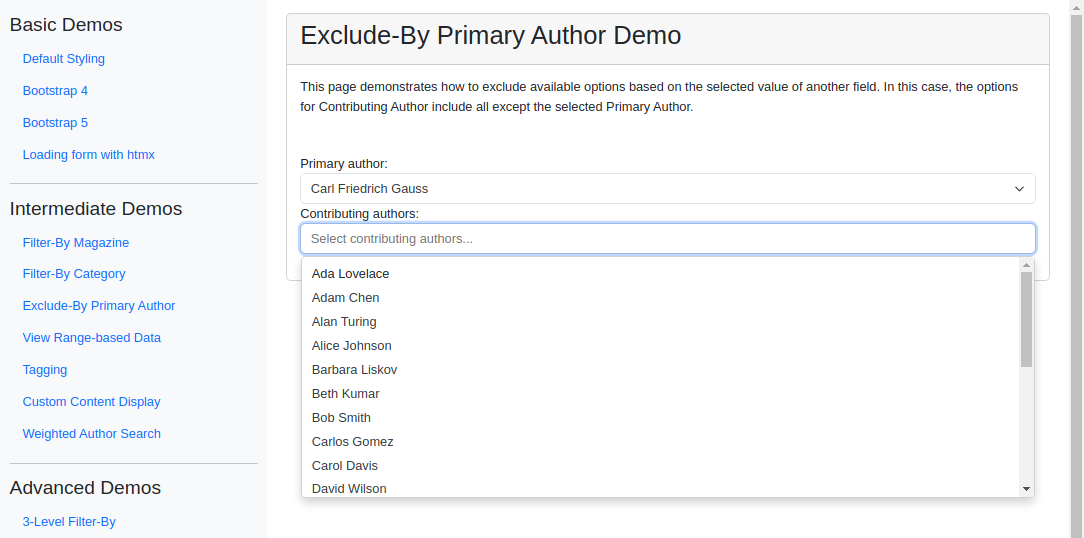
This example shows how to dynamically exclude options in one field based on the selection in another, using the exclude_by parameter. The “Contributing Authors” field excludes whoever is chosen as “Primary Author” so the same person can’t fill both roles, and stays empty until a Primary Author is selected. Reach for this pattern whenever overlapping selections between two related fields would be invalid or redundant.
Visual Examples
Key Code Segments
Forms
The form uses TomSelectModelChoiceField for the “Primary Author” and TomSelectModelMultipleChoiceField for “Contributing Authors”. The exclude_by parameter ensures contributing authors exclude the selected primary author.
Form Definition
class ExcludeByPrimaryAuthorForm(forms.Form):
    """Form with dependent fields demonstrating exclude_by functionality."""

    primary_author = TomSelectModelChoiceField(
        config=TomSelectConfig(
            url="autocomplete-author",
            value_field="id",
            label_field="name",
            css_framework="bootstrap5",
        ),
    )

    contributing_authors = TomSelectModelMultipleChoiceField(
        config=TomSelectConfig(
            url="autocomplete-author",
            value_field="id",
            label_field="name",
            exclude_by=("primary_author", "id"),
            css_framework="bootstrap5",
            placeholder=_("Select contributing authors..."),
            highlight=True,
            max_items=None,
            plugin_remove_button=PluginRemoveButton(),
        ),
        attrs={"class": "form-control mb-3"},
        required=False,
    )
Explanation:
The
exclude_byparameter in thecontributing_authorsfield ensures that any selected “Primary Author” is removed from the available options in the “Contributing Authors” field.The
RemoveButtonplugin improves user interaction by enabling quick removal of selected contributing authors.
Templates
The form is rendered in the exclude_by.html template, highlighting the exclusion mechanism between the two fields.
Template Code
{% extends 'example/base_with_bootstrap5.html' %}

{% block extra_header %}
    {{ form.media }}
    <style>
        .helptext {
            font-size: 10px;
            color: #757575;
        }
    </style>
{% endblock %}

{% block content %}
    <div class="card">
        <div class="card-header">
            <h2>Exclude-By Primary Author Demo</h2>
        </div>
        <div class="card-body">
            <div class="pb-5">
                This page demonstrates how to exclude available options based on the selected value of another field.
                In this case, the options for Contributing Author include all except the selected Primary Author.
            </div>
            <form>
                {% csrf_token %}
                {{ form.as_div }}
            </form>
        </div>
    </div>
{% endblock %}
Key Elements:
Bootstrap 5 for clean and modern styling.
The exclusion logic is visually reflected in the dropdowns as selections are made.
Autocomplete Views
The autocomplete-author endpoint serves data for both fields, ensuring proper exclusion logic based on the exclude_by parameter.
We override the
get_querysetmethod to filter authors based on the selected magazine (if any).The
hook_prepare_resultsmethod adds a formatted name to each author result for better readability.
Autocomplete View
class AuthorAutocompleteView(AutocompleteModelView):
    """Autocomplete view for Author model with annotations and advanced searching."""

    model = Author
    search_lookups = [
        "name__icontains",
        "bio__icontains",
    ]
    ordering = ["name"]
    page_size = 20
    value_fields = ["id", "name", "bio", "article_count", "active_articles"]

    list_url = "author-list"
    create_url = "author-create"
    update_url = "author-update"
    delete_url = "author-delete"

    skip_authorization = True

    def get_queryset(self):
        """Return a queryset of authors with article count annotations.

        Annotates:
        - Total number of articles by author
        - Number of active articles by author
        - Articles by magazine (as a string list)
        """
        queryset = super().get_queryset().with_details()

        # Filter by magazine if specified
        magazine_id = self.request.GET.get("magazine")
        if magazine_id:
            queryset = queryset.filter(article__magazine_id=magazine_id)

        return queryset

    def hook_prepare_results(self, results: list[dict[str, Any]]) -> list[dict[str, Any]]:
        """Add formatted_name to each result."""
        for author in results:
            author["formatted_name"] = f"{author['name']} ({author['article_count']} articles)"
        return results
See the Article List and Create example for a more comprehensive demonstration, which includes this functionality.