Generic Foreign Key Picker
Example Overview
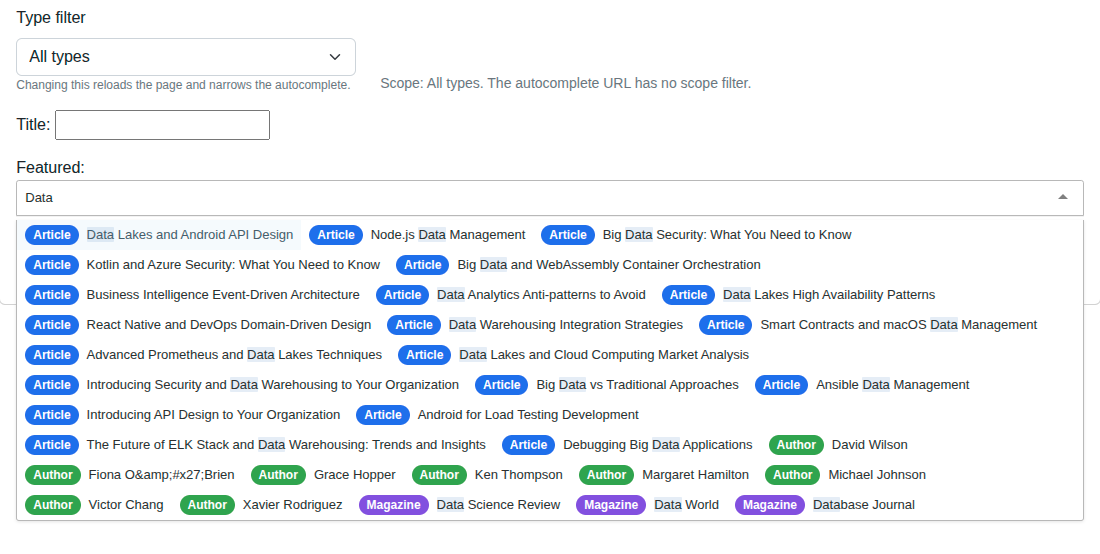
The Generic Foreign Key Picker example demonstrates a single autocomplete
field that can pick any row from multiple model types - an Article, an
Author, or a Magazine - and store the choice as a GenericForeignKey. The
widget is wired to a small adapter view (MultiTypeFeaturedAdapterView)
that fans out to the per-type autocomplete views and merges their results into
a single response, prefixing each row’s value with the type key
("article:42", "author:7", "magazine:3"). Reach for this pattern for
“featured item” widgets, audit-log row pickers, or any “tag one of N kinds of
thing” workflow where a single field must accept heterogeneous targets.
Visual Examples
Key Code Segments
Model with GenericForeignKey
from django.contrib.contenttypes.fields import GenericForeignKey
from django.contrib.contenttypes.models import ContentType


class Spotlight(models.Model):
    title = models.CharField(max_length=200)
    content_type = models.ForeignKey(ContentType, on_delete=models.CASCADE)
    object_id = models.PositiveIntegerField()
    content_object = GenericForeignKey("content_type", "object_id")
    featured_at = models.DateTimeField(auto_now_add=True)
Adapter autocomplete view
The adapter subclasses AutocompleteIterablesView and overrides get()
directly. Each subview is dispatched via Django’s as_view() so it runs its
own full setup >> dispatch >> get_queryset >> search >> prepare_results >> paginate
pipeline. The adapter merges the JSON results, prefixes each row’s value
with the type key, and sanitizes the final row.
from django.core.exceptions import PermissionDenied
from django.http import JsonResponse
from django_tomselect.utils import sanitize_dict
import json


class MultiTypeFeaturedAdapterView(AutocompleteIterablesView):
    skip_authorization = True
    page_size = 20

    def _get_routes(self):
        return [
            ("article", "Article", ArticleAutocompleteView, "title"),
            ("author", "Author", AuthorAutocompleteView, "name"),
            ("magazine", "Magazine", MagazineAutocompleteView, "name"),
        ]

    def get(self, request, *args, **kwargs):
        scope = request.GET.get("scope")
        rows = []
        for key, type_label, view_cls, label_field in self._get_routes():
            if scope and scope != key:
                continue
            try:
                sub_resp = view_cls.as_view()(request)
            except PermissionDenied:
                continue
            if sub_resp.status_code != 200:
                continue
            sub_payload = json.loads(sub_resp.content)
            pk_field = (getattr(view_cls, "value_fields", None) or ["id"])[0]
            for r in sub_payload.get("results", []):
                pk = r.get(pk_field, r.get("id", ""))
                rows.append(sanitize_dict({
                    "value": f"{key}:{pk}",
                    "label": str(r.get(label_field, "")),
                    "_type_key": key,
                    "_type_label": type_label,
                }))
        # First-page-only: the adapter calls each subview once and merges.
        # has_more=False matches reality and avoids a broken contract with
        # the frontend (which needs both has_more and next_page truthy to
        # paginate).
        return JsonResponse({
            "results": rows, "page": 1,
            "has_more": False, "next_page": None,
        })
Custom widget for server-side initial-value resolution
TomSelectModelWidget rejects non-model autocomplete views, so we extend the
iterables widget instead. We override _get_selected_options to parse
"type:id", look up the model instance, and emit {value, label} pairs that
the package’s render path can consume.
_GFK_TYPE_MAP = {
    "article": "article",
    "author": "author",
    "magazine": "magazine",
}


class TomSelectGFKWidget(TomSelectIterablesWidget):
    """Widget that resolves selected ``type:id`` values to ``{value, label}`` server-side.

    Overriding ``_get_selected_options`` lets us look up the underlying model
    instance and emit a human-readable label without making a roundtrip through
    the autocomplete URL. The widget context preserves the configured
    ``value_field``/``label_field`` ("value"/"label") so the rendered
    ``allOptions`` array carries the same row shape the AJAX endpoint emits.

    The ``scope`` constructor kwarg, when set, narrows results to one operator
    by appending ``?scope=<key>`` to the autocomplete URL via
    ``get_autocomplete_params`` (the widget mixin's documented extension point
    for extra query-string params).
    """

    def __init__(self, *args, scope: str | None = None, **kwargs):
        """Capture the optional ``scope`` kwarg before delegating to the widget."""
        self.scope = (scope or "").strip() or None
        super().__init__(*args, **kwargs)

    def get_autocomplete_params(self):  # type: ignore[override]
        """Append ``scope=<key>`` to the autocomplete URL's query string."""
        base = super().get_autocomplete_params() or ""
        if not self.scope:
            return base
        suffix = f"scope={self.scope}"
        if not base:
            return suffix
        # Append to existing query string. The mixin's default return is a
        # string (possibly empty) - concatenate with '&' on either side.
        sep = "&" if not base.endswith("&") else ""
        return f"{base}{sep}{suffix}"

    def get_autocomplete_context(self):  # type: ignore[override]
        """Expose ``autocomplete_params`` so the iterables template renders it."""
        # The iterables widget's get_autocomplete_context does NOT call
        # get_autocomplete_params (only the model widget does). Add the key
        # ourselves so the template can render ``autocompleteParams:``.
        ctx = super().get_autocomplete_context()
        ctx["autocomplete_params"] = self.get_autocomplete_params()
        return ctx

    def _resolve_pair(self, raw: str):
        """Parse ``"type:id"`` and return ``(value, label)`` or ``None``."""
        from example_project.example.models import (
            Article as _Article,
            Author as _Author,
            Magazine as _Magazine,
        )

        raw = (raw or "").strip()
        if not raw or ":" not in raw:
            return None
        type_key, _, obj_id = raw.partition(":")
        type_key = type_key.strip()
        if type_key not in _GFK_TYPE_MAP or not obj_id.strip():
            return None
        try:
            pk = int(obj_id.strip())
        except ValueError:
            return None
        try:
            if type_key == "article":
                obj = _Article.objects.get(pk=pk)
                label = obj.title
            elif type_key == "author":
                obj = _Author.objects.get(pk=pk)
                label = obj.name
            else:  # magazine
                obj = _Magazine.objects.get(pk=pk)
                label = obj.name
        except Exception:
            return None
        return raw, label

    def _get_selected_options(self, value):  # type: ignore[override]
        if not value:
            return []
        values = value if isinstance(value, (list, tuple)) else [value]
        rows = []
        for raw in values:
            pair = self._resolve_pair(raw)
            if pair is None:
                # Fall back to the raw value so the chip is still rendered.
                rows.append({"value": raw, "label": raw})
                continue
            v, label = pair
            rows.append({"value": v, "label": label})
        return rows
The package’s tomselect.html template only serializes value + label +
action-URLs into allOptions, so any _type_* metadata you return is
dropped. Instead, the demo’s Tom Select option/item render templates
derive the type pill client-side from data.value.split(':')[0] - keeping
the metadata coupled to the value, not to widget-side serialization tricks.
<script>
window.dtsGfkRenderers = (function () {
    var TYPE_LABELS = {article: 'Article', author: 'Author', magazine: 'Magazine'};
    function row(data, escape) {
        var key = (data.value || '').split(':')[0];
        var label = TYPE_LABELS[key] || key;
        return '<div class="dts-gfk-row">' +
            '<span class="dts-type-pill dts-type-' + escape(key) + '">' + escape(label) + '</span>' +
            '<span>' + escape(data.label || '') + '</span></div>';
    }
    return { option: row, item: row };
})();
</script>
Form field that resolves "type:id" to a ContentType pair
class TomSelectGenericForeignKeyField(forms.CharField):
    """Form field that round-trips a ``"type:id"`` opaque string.

    ``clean`` parses the value into ``(content_type, object_id)``, validates
    that the referenced object exists, and stashes the resolved pair on
    ``self._gfk_resolved`` so the view can apply it to a ``Spotlight``.
    """

    def __init__(self, *args, **kwargs):
        """Initialize the field and reset the resolved-pair cache."""
        super().__init__(*args, **kwargs)
        self._gfk_resolved = None

    def clean(self, value):
        """Validate the ``"type:id"`` string and resolve it to a real instance."""
        raw = super().clean(value)
        self._gfk_resolved = None
        if not raw:
            if self.required:
                raise ValidationError(self.error_messages["required"], code="required")
            return ""
        if ":" not in raw:
            raise ValidationError(_("Invalid value. Expected '<type>:<id>'."))
        type_key, _sep, obj_id = raw.partition(":")
        type_key = type_key.strip()
        if type_key not in _GFK_TYPE_MAP:
            raise ValidationError(_("Unknown type %(t)r.") % {"t": type_key})
        try:
            pk = int((obj_id or "").strip())
        except ValueError as exc:
            raise ValidationError(_("Object id must be an integer.")) from exc

        # Resolve to ContentType + object so the view can persist a Spotlight.
        from django.contrib.contenttypes.models import ContentType
        from example_project.example.models import Article, Author, Magazine

        model = {"article": Article, "author": Author, "magazine": Magazine}[type_key]
        try:
            obj = model.objects.get(pk=pk)
        except model.DoesNotExist as exc:
            raise ValidationError(_("Selected object no longer exists.")) from exc
        ct = ContentType.objects.get_for_model(model)
        self._gfk_resolved = (ct, obj.pk, obj)
        return raw
View - persisting a Spotlight
def gfk_picker_view(request: HttpRequest) -> HttpResponse:
    """Generic Foreign Key picker demo.

    On submit, persists a :class:`Spotlight` row using the resolved
    ``(content_type, object_id)`` from the form field. The optional
    ``?scope=`` query param narrows the picker to a single operator key.
    """
    scope = (request.GET.get("scope") or "").strip() or None
    if scope not in (None, "article", "author", "magazine"):
        scope = None

    if request.method == "POST":
        form = SpotlightForm(request.POST, scope=scope)
        if form.is_valid():
            ct, obj_id, _obj = form.fields["featured"]._gfk_resolved
            Spotlight.objects.create(
                title=form.cleaned_data["title"],
                content_type=ct,
                object_id=obj_id,
            )
            target = reverse("gfk-picker")
            if scope:
                target = f"{target}?scope={scope}"
            return HttpResponseRedirect(target)
    else:
        form = SpotlightForm(scope=scope)

    spotlights = (
        Spotlight.objects.select_related("content_type")
        .order_by("-featured_at")[:25]
    )

    return TemplateResponse(
        request,
        "example/advanced_demos/gfk_picker.html",
        {"form": form, "spotlights": spotlights, "scope": scope or ""},
    )
Form widget config
The widget MUST configure value_field="value" and label_field="label" -
TomSelectConfig defaults are id/name (app_settings.py:482), but the
adapter emits value/label, so a mismatch would break the round-trip.
featured = TomSelectGenericForeignKeyField(
    required=True,
    widget=TomSelectGFKWidget(
        config=TomSelectConfig(
            url="autocomplete-multi-type-featured",
            value_field="value",
            label_field="label",
            placeholder="Search Articles / Authors / Magazines…",
            minimum_query_length=1,
            load_throttle=300,
        ),
    ),
)
URL Wiring
path(
    "autocomplete/multi-type-featured/",
    autocompletes.MultiTypeFeaturedAdapterView.as_view(),
    name="autocomplete-multi-type-featured",
),
path("demo-gfk-picker/", views.gfk_picker_view, name="gfk-picker"),
Try It
Action |
Result |
|---|---|
Type an author name |
Dropdown rows tagged with a green “Author” pill. |
Type an article title |
Rows tagged with a blue “Article” pill. |
Type a magazine name |
Rows tagged with a purple “Magazine” pill. |
Change the scope dropdown to “Articles only” and reload |
Only article rows appear. |
Submit the form |
A new |
Submit twice without changing the input |
Each submit creates a new |
Why an Adapter, Not CompositeAutocompleteView Directly
CompositeAutocompleteView is the right routing primitive for the package’s
token-search use case. For a regular Tom Select model picker, it’s not a
drop-in:
Widget rejects non-model views.
TomSelectModelWidgetvalidates that its autocomplete view is anAutocompleteModelViewsubclass with a single model/queryset. The composite view does not satisfy that.Default AJAX uses
?q=. The widget’s default fetch hits?q=<query>. The composite view defaults to?mode=operatorsfor that path - different protocol entirely.
The adapter sits in between: it exposes the standard ?q= API the widget
expects while internally routing to per-type subviews. If the package later
ships a built-in adapter, this demo is a reference implementation.