# Generic Foreign Key Picker
## Example Overview
The **Generic Foreign Key Picker** example demonstrates a single autocomplete
field that can pick *any* row from multiple model types — an Article, an
Author, or a Magazine — and store the choice as a `GenericForeignKey`.
The widget is wired to a small **adapter view** (`MultiTypeFeaturedAdapterView`)
that fans out to the per-type autocomplete views and merges their results into
a single response, prefixing each row's `value` with the type key
(`"article:42"`, `"author:7"`, `"magazine:3"`).
**Objective**:
- Show how to back a single tomselect widget with multiple heterogeneous
autocomplete sources without modifying the package.
- Pin down the adapter pattern using Django's `as_view()` dispatch — the same
approach the package's own `CompositeAutocompleteView._delegate_value` uses,
so per-type permissions, search, pagination, and `prepare_results` continue
to run normally per subview.
- Document why `CompositeAutocompleteView` cannot be plugged directly into
`TomSelectModelWidget` and what to do instead.
**Use Case**:
- "Featured item" widgets (spotlights, attachments, mentions) where any
model can be the subject.
- Audit-log row pickers — pick the object the log entry is about.
- "Tag any of N kinds of thing" workflows in admin / triage tools.
**Visual Examples**
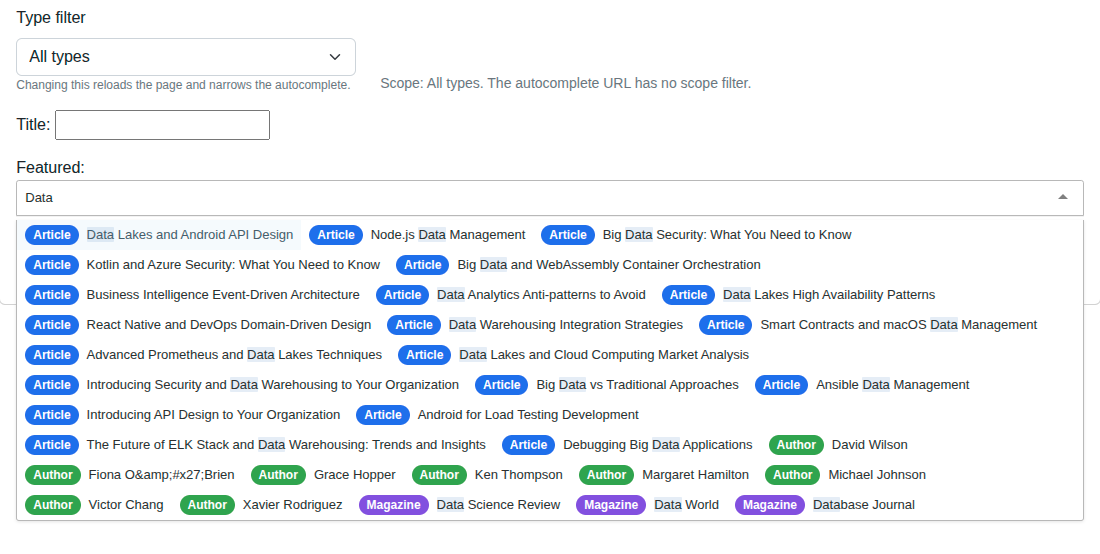
---
## Key Code Segments
### Model with `GenericForeignKey`
```python
from django.contrib.contenttypes.fields import GenericForeignKey
from django.contrib.contenttypes.models import ContentType
class Spotlight(models.Model):
title = models.CharField(max_length=200)
content_type = models.ForeignKey(ContentType, on_delete=models.CASCADE)
object_id = models.PositiveIntegerField()
content_object = GenericForeignKey("content_type", "object_id")
featured_at = models.DateTimeField(auto_now_add=True)
```
### Adapter autocomplete view
The adapter subclasses `AutocompleteIterablesView` and overrides `get()`
directly. Each subview is dispatched via Django's `as_view()` so it runs its
own full `setup → dispatch → get_queryset → search → prepare_results → paginate`
pipeline. The adapter merges the JSON results, prefixes each row's `value`
with the type key, and sanitizes the final row.
```python
from django.core.exceptions import PermissionDenied
from django.http import JsonResponse
from django_tomselect.utils import sanitize_dict
import json
class MultiTypeFeaturedAdapterView(AutocompleteIterablesView):
skip_authorization = True
page_size = 20
def _get_routes(self):
return [
("article", "Article", ArticleAutocompleteView, "title"),
("author", "Author", AuthorAutocompleteView, "name"),
("magazine", "Magazine", MagazineAutocompleteView, "name"),
]
def get(self, request, *args, **kwargs):
scope = request.GET.get("scope")
rows = []
for key, type_label, view_cls, label_field in self._get_routes():
if scope and scope != key:
continue
try:
sub_resp = view_cls.as_view()(request)
except PermissionDenied:
continue
if sub_resp.status_code != 200:
continue
sub_payload = json.loads(sub_resp.content)
pk_field = (getattr(view_cls, "value_fields", None) or ["id"])[0]
for r in sub_payload.get("results", []):
pk = r.get(pk_field, r.get("id", ""))
rows.append(sanitize_dict({
"value": f"{key}:{pk}",
"label": str(r.get(label_field, "")),
"_type_key": key,
"_type_label": type_label,
}))
# First-page-only: the adapter calls each subview once and merges.
# has_more=False matches reality and avoids a broken contract with
# the frontend (which needs both has_more and next_page truthy to
# paginate).
return JsonResponse({
"results": rows, "page": 1,
"has_more": False, "next_page": None,
})
```
### Custom widget for server-side initial-value resolution
`TomSelectModelWidget` rejects non-model autocomplete views, so we extend the
iterables widget instead. We override `_get_selected_options` to parse
`"type:id"`, look up the model instance, and emit `{value, label}` pairs that
the package's render path can consume.
```python
class TomSelectGFKWidget(TomSelectIterablesWidget):
def _get_selected_options(self, value):
if not value:
return []
values = value if isinstance(value, (list, tuple)) else [value]
rows = []
for raw in values:
type_key, _, obj_id = raw.partition(":")
model = {"article": Article, "author": Author, "magazine": Magazine}.get(type_key)
try:
obj = model.objects.get(pk=int(obj_id))
label = obj.title if type_key == "article" else obj.name
except Exception:
label = raw
rows.append({"value": raw, "label": label})
return rows
```
The package's `tomselect.html` template only serializes `value` + `label` +
action-URLs into `allOptions`, so any `_type_*` metadata you return is
dropped. Instead, the demo's Tom Select `option`/`item` render templates
derive the type pill *client-side* from `data.value.split(':')[0]` — keeping
the metadata coupled to the value, not to widget-side serialization tricks.
```html
```
### Form field that resolves `"type:id"` to a `ContentType` pair
```python
class TomSelectGenericForeignKeyField(forms.CharField):
def clean(self, value):
raw = super().clean(value)
if not raw:
return ""
type_key, _, obj_id = raw.partition(":")
model = {"article": Article, "author": Author, "magazine": Magazine}[type_key]
obj = model.objects.get(pk=int(obj_id))
ct = ContentType.objects.get_for_model(model)
self._gfk_resolved = (ct, obj.pk, obj)
return raw
```
### View — persisting a Spotlight
```python
def gfk_picker_view(request):
if request.method == "POST":
form = SpotlightForm(request.POST)
if form.is_valid():
ct, obj_id, _obj = form.fields["featured"]._gfk_resolved
Spotlight.objects.create(
title=form.cleaned_data["title"],
content_type=ct,
object_id=obj_id,
)
return HttpResponseRedirect(reverse("gfk-picker"))
else:
form = SpotlightForm()
spotlights = Spotlight.objects.select_related("content_type")[:25]
return TemplateResponse(request, "example/advanced_demos/gfk_picker.html",
{"form": form, "spotlights": spotlights})
```
### Form widget config
The widget MUST configure `value_field="value"` and `label_field="label"` —
`TomSelectConfig` defaults are `id`/`name` (`app_settings.py:482`), but the
adapter emits `value`/`label`, so a mismatch would break the round-trip.
```python
featured = TomSelectGenericForeignKeyField(
required=True,
widget=TomSelectGFKWidget(
config=TomSelectConfig(
url="autocomplete-multi-type-featured",
value_field="value",
label_field="label",
placeholder="Search Articles / Authors / Magazines…",
),
),
)
```
### URL Wiring
```python
path(
"autocomplete/multi-type-featured/",
autocompletes.MultiTypeFeaturedAdapterView.as_view(),
name="autocomplete-multi-type-featured",
),
path("demo-gfk-picker/", views.gfk_picker_view, name="gfk-picker"),
```
---
## Try It
| Action | Result |
|---|---|
| Type an author name | Dropdown rows tagged with a green "Author" pill. |
| Type an article title | Rows tagged with a blue "Article" pill. |
| Type a magazine name | Rows tagged with a purple "Magazine" pill. |
| Change the scope dropdown to "Articles only" and reload | Only article rows appear. |
| Submit the form | A new `Spotlight` is created with the correct `content_type` + `object_id`; the recent-spotlights list updates. |
| Submit twice without changing the input | Each submit creates a new `Spotlight` row pointing at the same target. |
---
## Why an Adapter, Not `CompositeAutocompleteView` Directly
`CompositeAutocompleteView` is the right routing primitive for the package's
token-search use case. For a regular Tom Select model picker, it's not a
drop-in:
1. **Widget rejects non-model views.** `TomSelectModelWidget` validates that
its autocomplete view is an `AutocompleteModelView` subclass with a single
model/queryset. The composite view does not satisfy that.
2. **Default AJAX uses `?q=`.** The widget's default fetch hits `?q=`.
The composite view defaults to `?mode=operators` for that path — different
protocol entirely.
The adapter sits in between: it exposes the standard `?q=` API the widget
expects while internally routing to per-type subviews. If the package later
ships a built-in adapter, this demo is a reference implementation.
---
## Related
- {doc}`article_token_search` — the other consumer of multi-type routing.
- API reference: `AutocompleteIterablesView`, `TomSelectIterablesWidget`,
`sanitize_dict`.